Introduction: What is Phantom Wallet and Why is it a Great Choice for Crypto Swaps?
Phantom Wallet is a popular self-custodial, multi-chain cryptocurrency wallet that was originally designed for the Solana blockchain and has since expanded to support multiple networks. Today, Phantom supports Solana, Ethereum and Ethereum-compatible networks (such as Polygon and Base), as well as Bitcoin and several emerging ecosystems.
Known for its user-friendly interface, fast transaction speeds on Solana, and seamless in-wallet swaps, Phantom Wallet makes managing, storing, and swapping tokens efficient for both beginners and experienced crypto users. Transaction costs depend on the selected blockchain: while Solana transactions are typically fast and inexpensive, Ethereum-based swaps may incur higher gas fees during periods of network congestion.
Phantom Wallet provides a secure, non-custodial solution, meaning users retain full control over their private keys and funds. Phantom does not have access to users’ assets, and all transactions are signed locally by the user.
Phantom Wallet is particularly well suited for Solana users, but its expanding multi-chain support makes it a versatile option for managing assets across different blockchain ecosystems. Phantom Wallet primarily focuses on same-chain swaps within supported networks such as Solana and Ethereum. Limited cross-chain swap options may be available through integrated third-party providers; however, these routes depend on specific network combinations, token pairs, liquidity conditions, and regional availability. Cross-chain swaps should be considered an auxiliary feature rather than a core function of the wallet.
Pros and Cons of Swapping Tokens in Phantom Wallet
Pros
Low Fees on Supported Networks: Phantom Wallet offers competitive swap fees on supported token pairs. On Solana, fees are typically low, while Ethereum-based swaps depend on current gas prices.
Fast Transactions: Swaps on Solana are processed quickly thanks to the network’s high throughput and low latency, ensuring a smooth user experience.
User-Friendly Interface: The wallet’s intuitive design makes it easy for both beginners and experienced users to navigate and perform token swaps with ease.
Cons
Limited Cross-Chain Routes: While Phantom supports cross-chain swaps, they are only available for specific network combinations and token pairs. Not all assets or blockchains are supported.
Higher Fees for Bitcoin: Bitcoin-related swaps may involve higher fees depending on Bitcoin network congestion and the bridge or liquidity provider.
Network-Specific Fees: While Phantom offers low fees overall, Ethereum transactions often incur higher gas fees, particularly during periods of network congestion.
How to Swap Tokens in Phantom Wallet: A Step-by-Step Guide
One of the most popular features of Phantom Wallet is the ability to swap tokens directly within the wallet. Phantom aggregates liquidity from decentralized exchanges (DEXs) and, where applicable, cross-chain swap providers to find available routes.
Step 1: Open Phantom Wallet
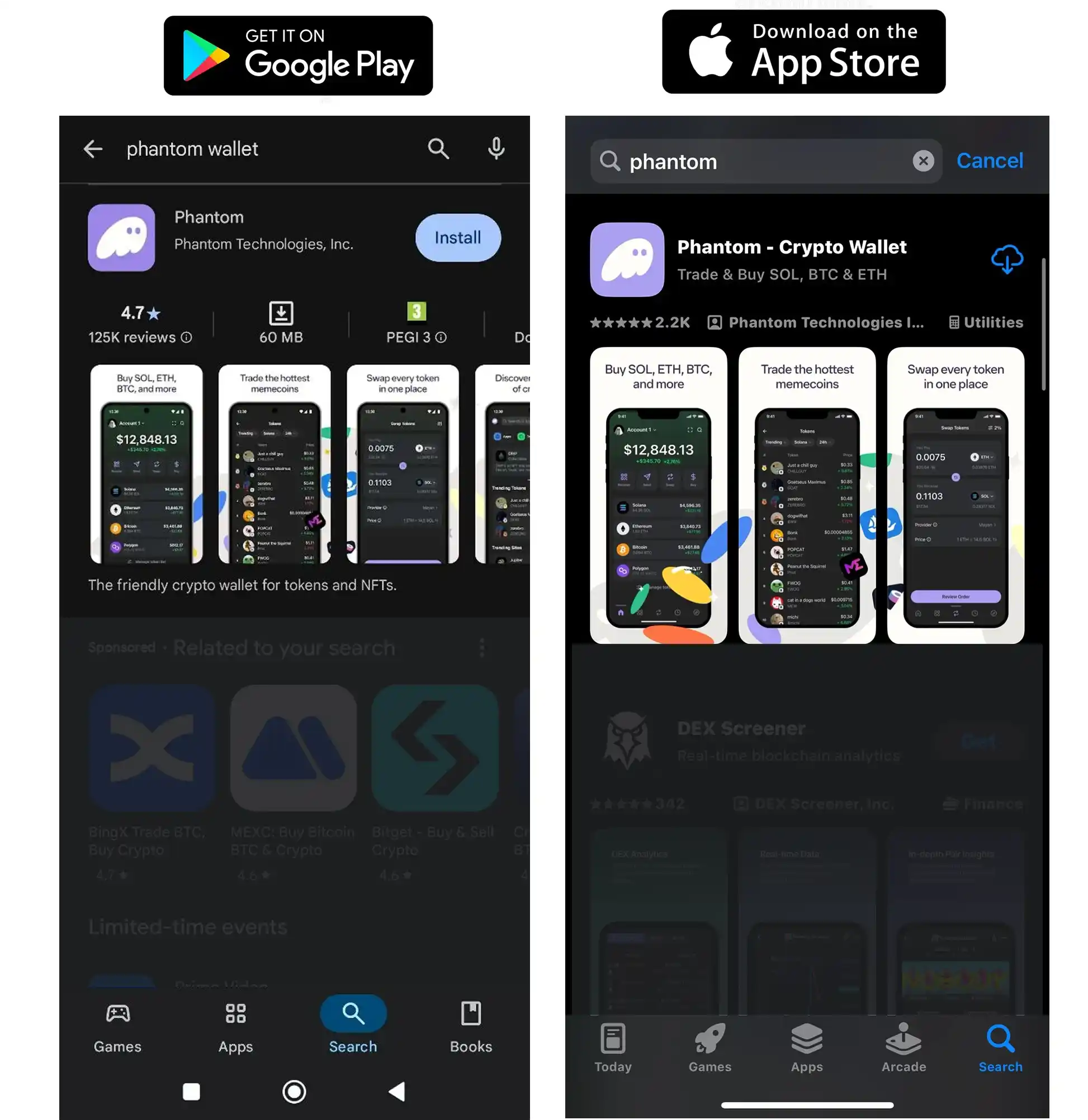
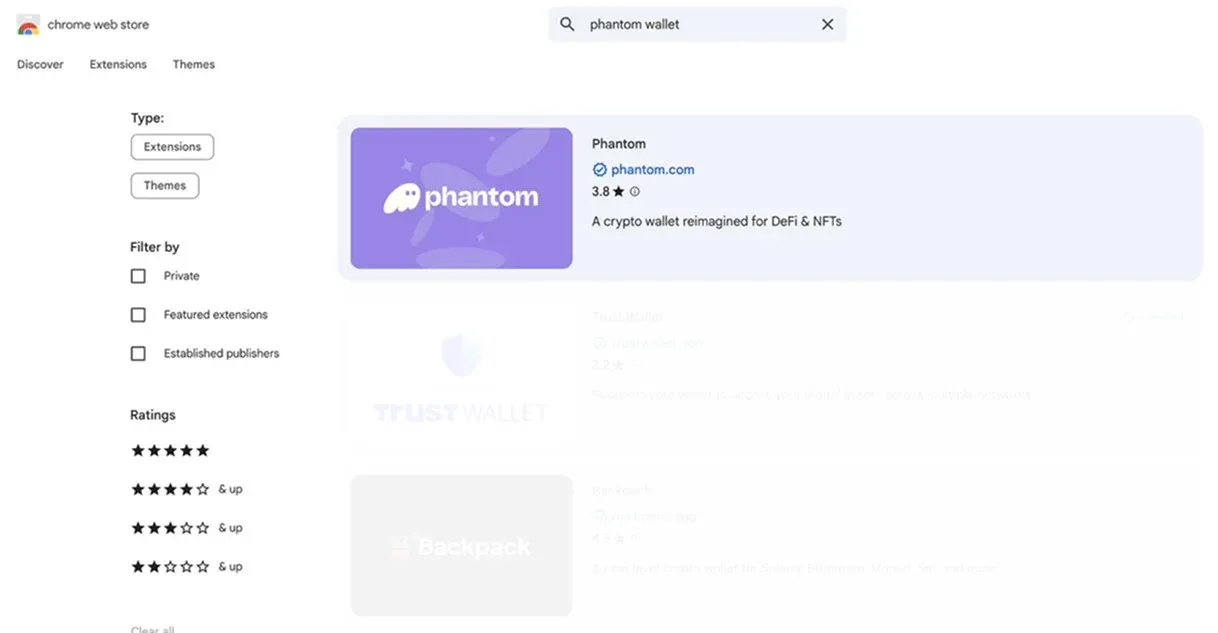
Open your Phantom Wallet browser extension or mobile app. If you don’t have Phantom Wallet installed yet, you can download it from the official Phantom website. Phantom is available as:
a browser extension for Chrome, Firefox, Brave, and Edge
a mobile app for iOS and Android
Always make sure you are downloading Phantom Wallet only from official sources to avoid phishing or fake applications. After installation, create a new wallet or import an existing one using your recovery phrase, then proceed to the swap feature.
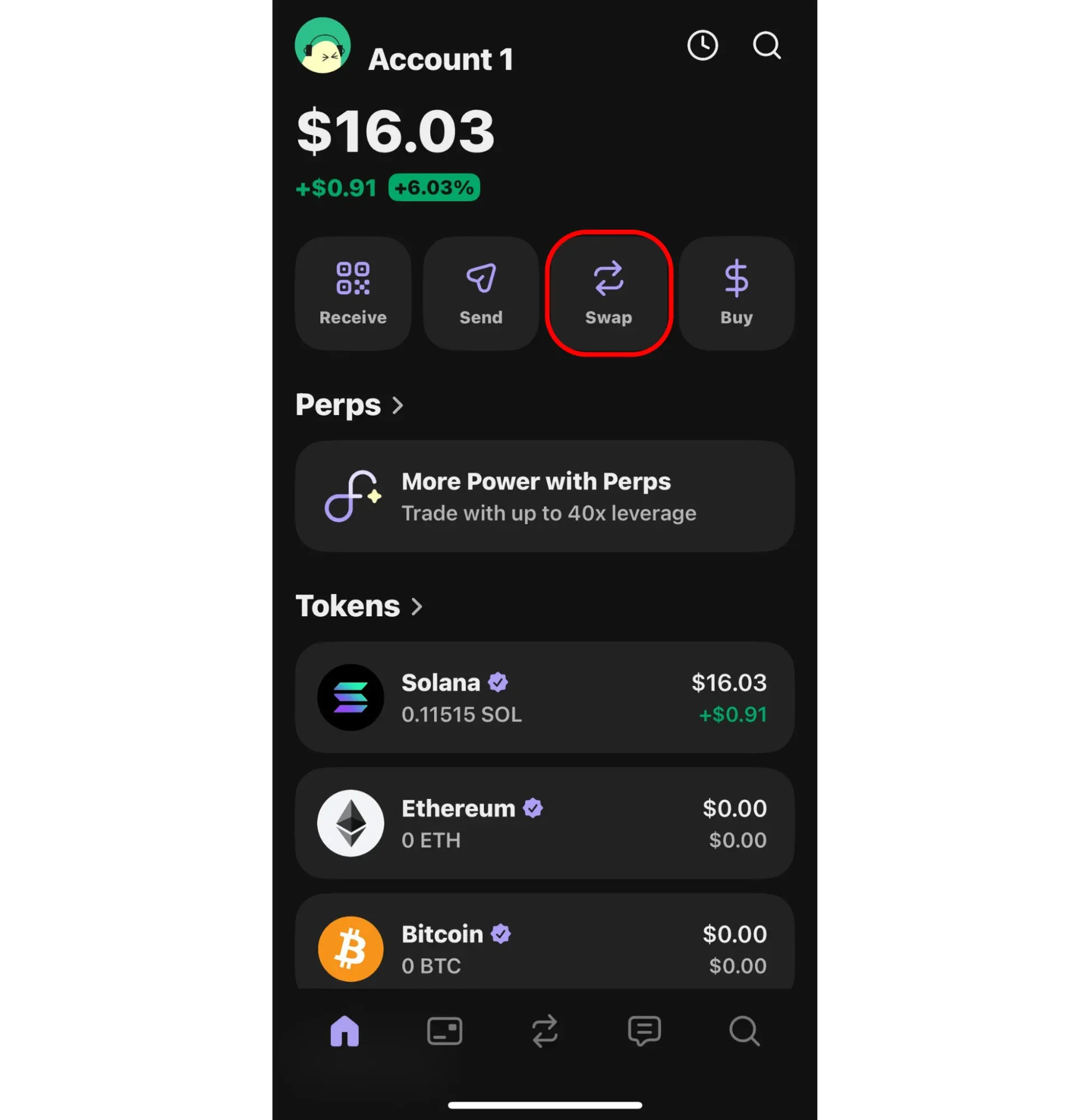
Step 2: Navigate to the Swap Tab
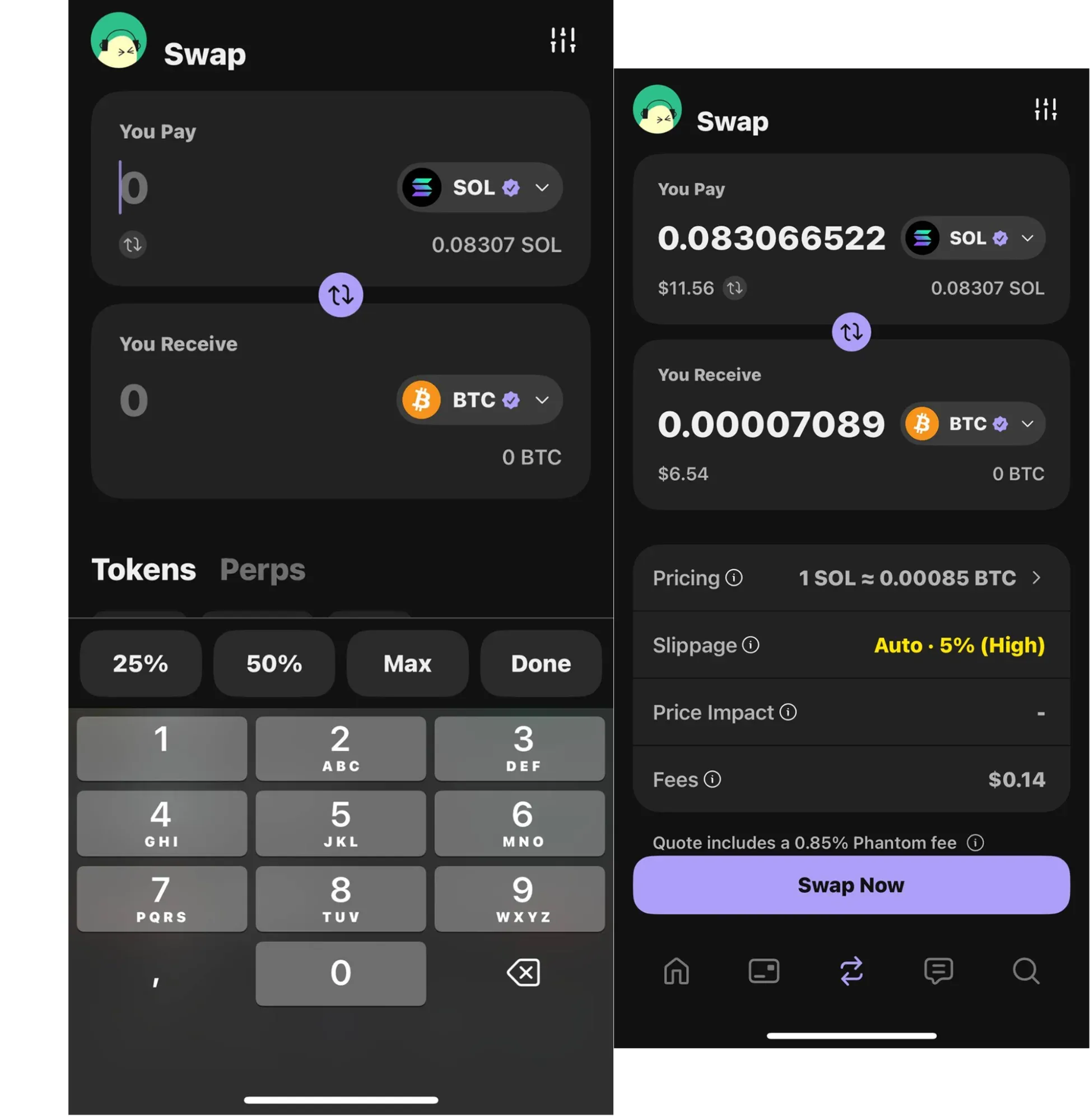
In the main menu, click on the Swap tab to open the swap interface.
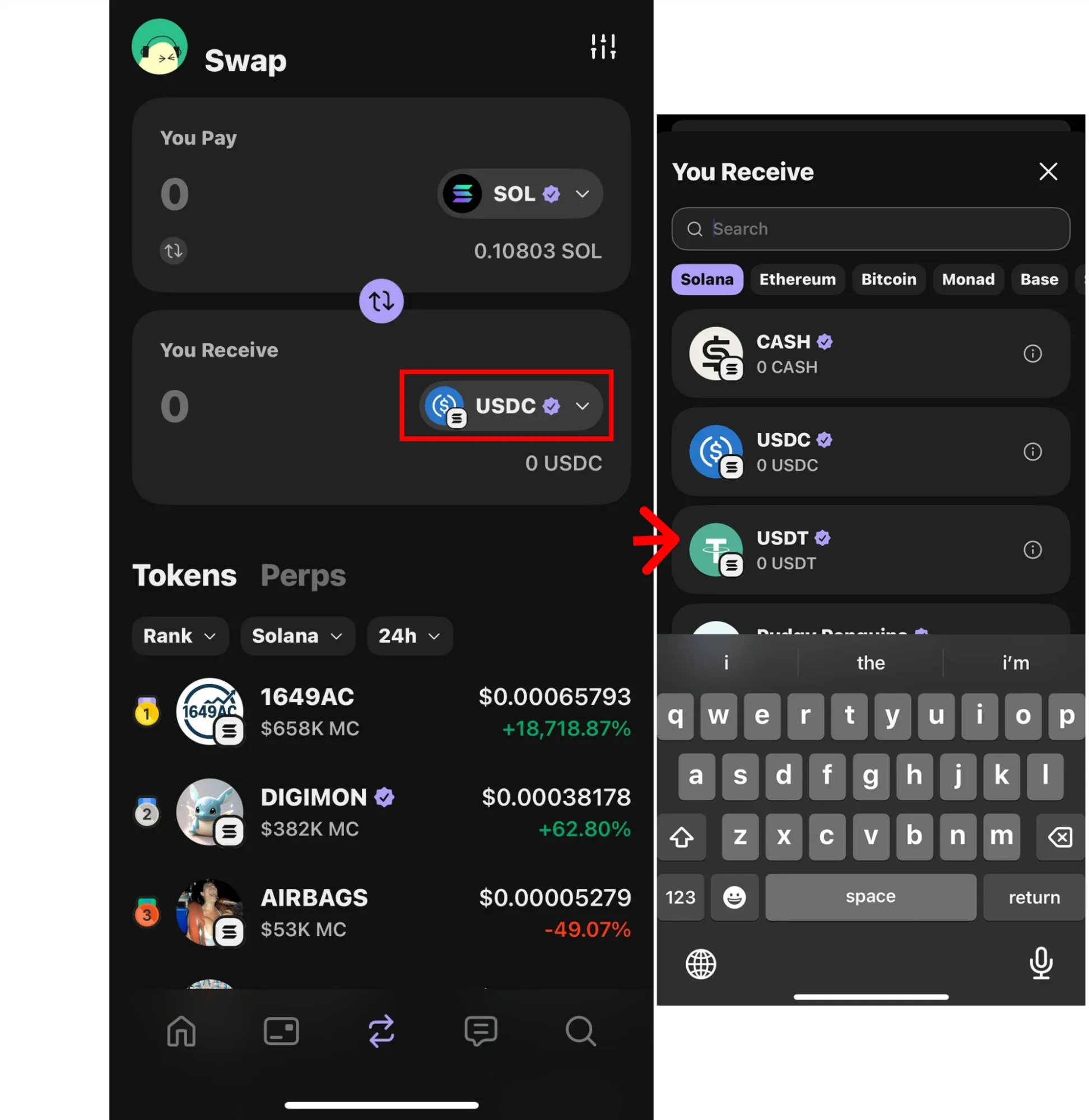
Step 3: Select the Tokens for the Swap
In the You Pay field, choose the token and network you want to swap from (for example, SOL on Solana or ETH on Ethereum).
In the You Receive field, choose the token you want to receive. In most cases, swaps are performed within the same blockchain network. In limited situations, certain cross-chain routes may be displayed through third-party providers. Support for assets such as Bitcoin in swap transactions is not guaranteed and depends entirely on provider availability, routing conditions, and the selected network pair.
Note: If you do not see a network (such as Bitcoin), ensure it is enabled in your Active Networks settings.
Step 4: Enter the Amount
Enter the amount you wish to swap. Phantom will display the estimated amount you will receive based on current rates and available routes.
Step 5: Review the Transaction Fees
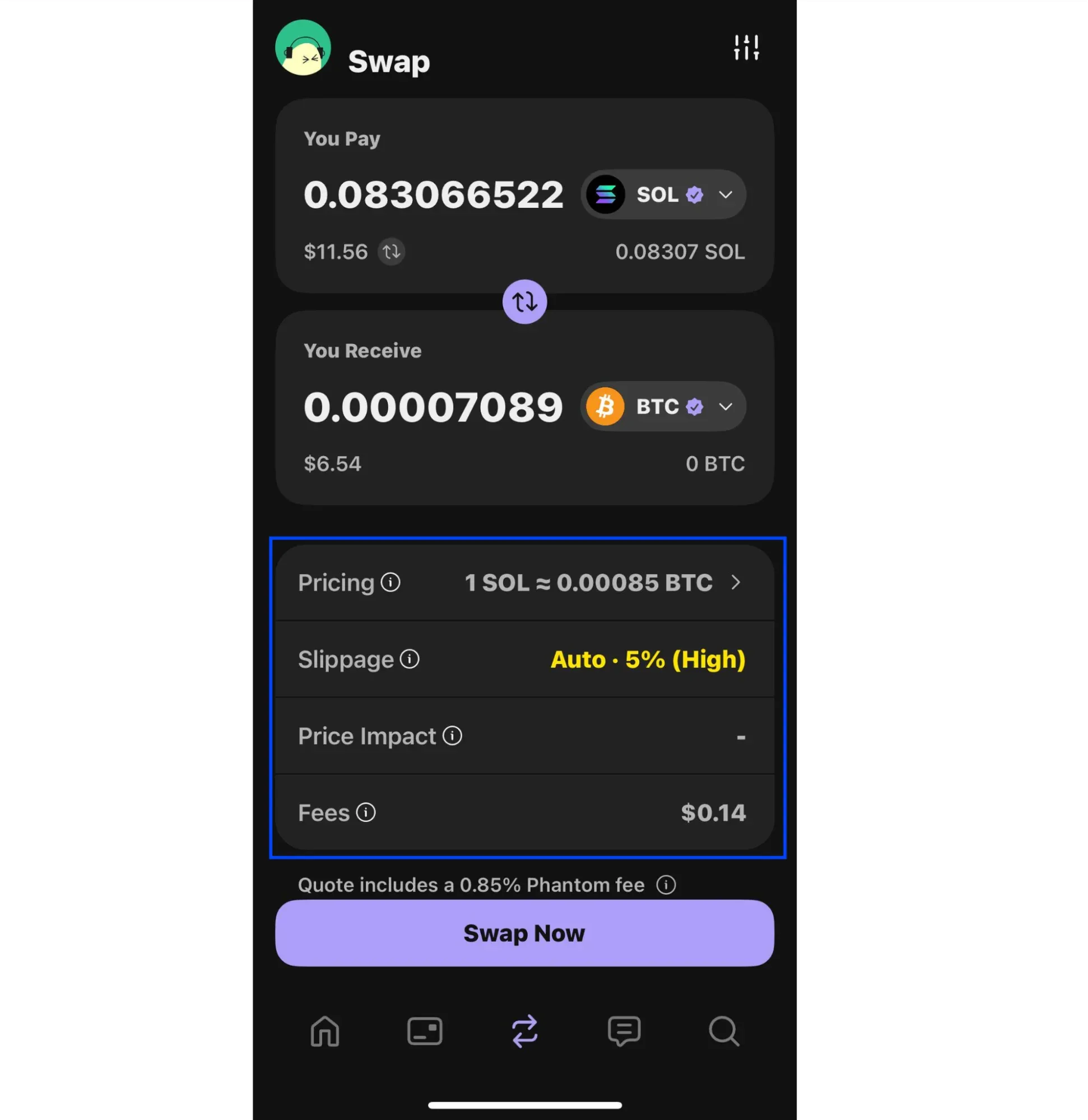
Phantom shows a detailed fee breakdown before confirmation. Fees may include:
Phantom swap fees (on certain pairs)
Network transaction fees
Bridge or liquidity provider fees for cross-chain swaps
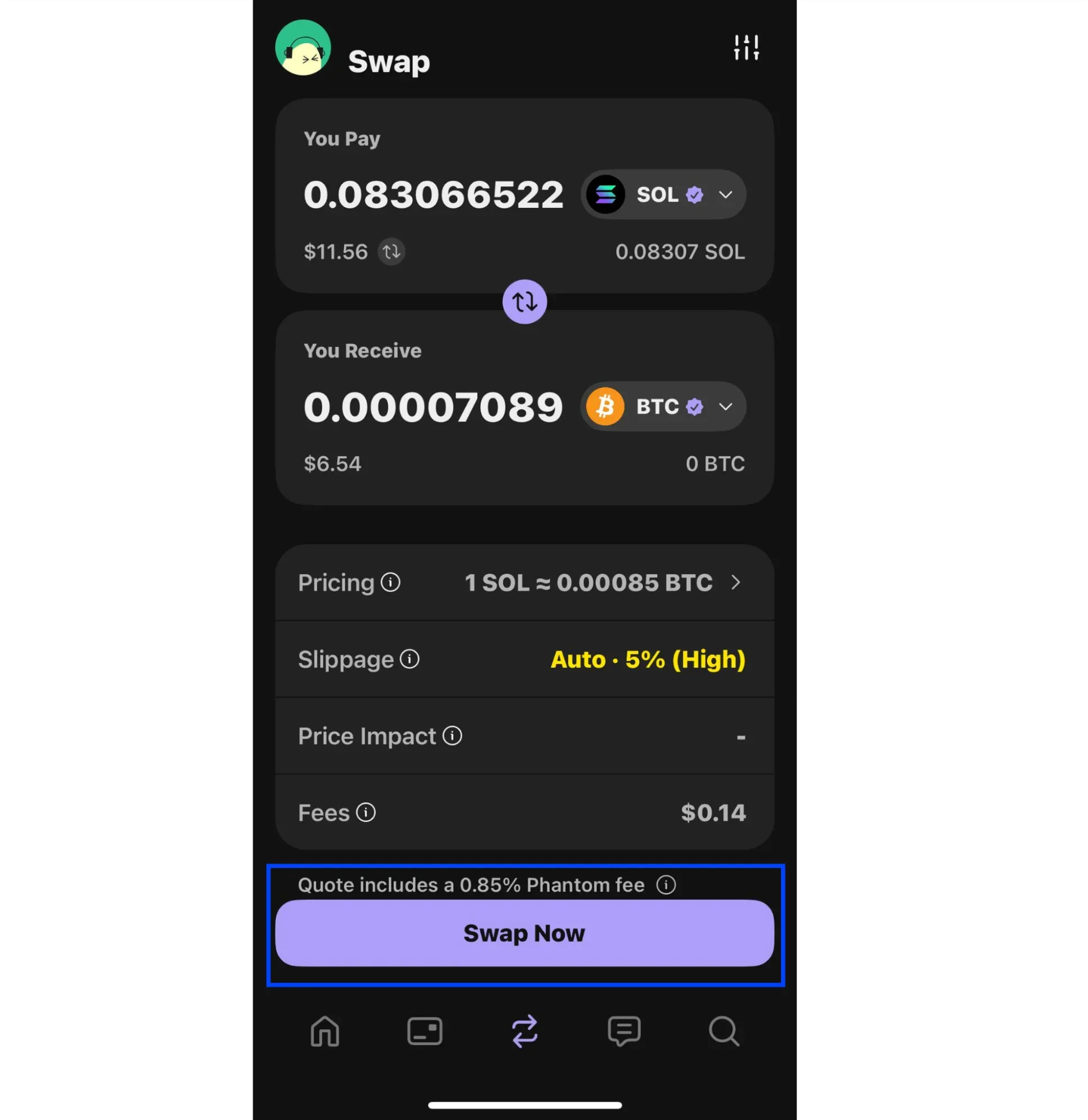
Step 6: Confirm the Swap
Ensure you have enough of the native token of the originating network (such as SOL or ETH) to cover transaction fees.
After reviewing all details, click Swap to execute the transaction.
Step 7: Track the Transaction
You can track your swap in the Recent Activity section or by using a relevant blockchain explorer.
Understanding Phantom Wallet Fees
Swap Fees
Phantom charges a 0.85% fee on select swap pairs. This fee is clearly displayed before you confirm a transaction and does not apply to all swaps.
Network Fees
Network (gas) fees are paid in the native token of the blockchain used for the transaction, such as SOL or ETH.
Cross-Chain Fees
For cross-chain swaps, additional bridge or liquidity provider fees may apply. These are included in the final quote shown before confirmation.
Cross-Chain Swapping: What Are the Limitations of Phantom Wallet?
Phantom Wallet supports cross-chain swaps for specific networks and token pairs, but it does not offer universal interoperability across all blockchains.
What is Cross-Chain Swapping?
Cross-chain swaps allow users to exchange assets between different blockchains, such as swapping Ethereum-based tokens for Bitcoin or Solana-based assets.
Phantom supports cross-chain swaps through integrated providers, but availability depends on:
Supported networks
Supported token pairs
Liquidity and routing availability
Some blockchains and assets may not be supported for direct cross-chain swaps within Phantom.
4. How to Swap Tokens Across Chains: An Alternative Solution
If a desired cross-chain route is not supported in Phantom Wallet, external swap services can be used as an alternative.
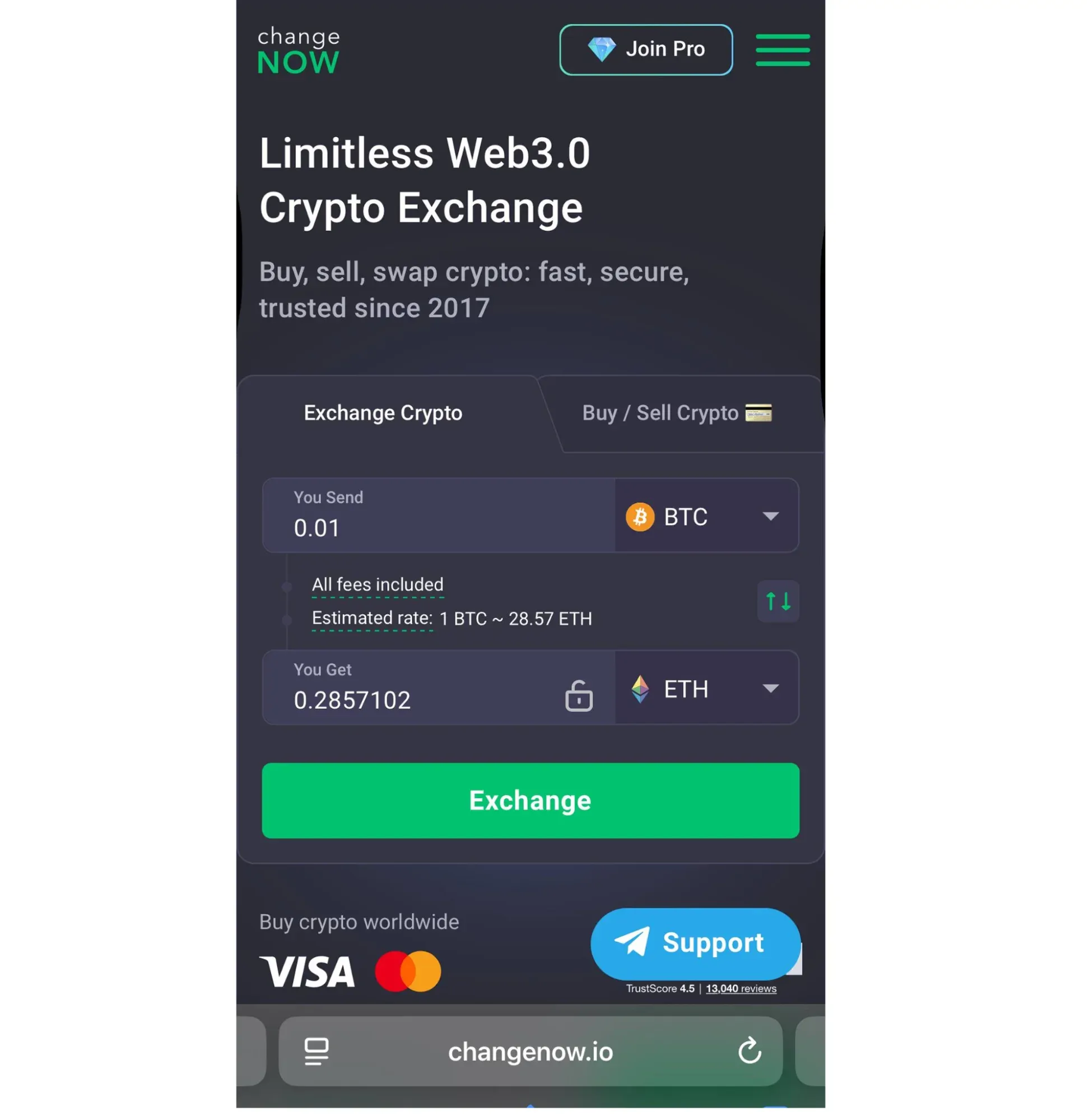
One such service is ChangeNOW, which allows users to exchange assets across different blockchains without creating an exchange account. ChangeNOW supports a wide range of networks, including Bitcoin, Solana, and Ethereum.
How to Swap Tokens Using ChangeNOW
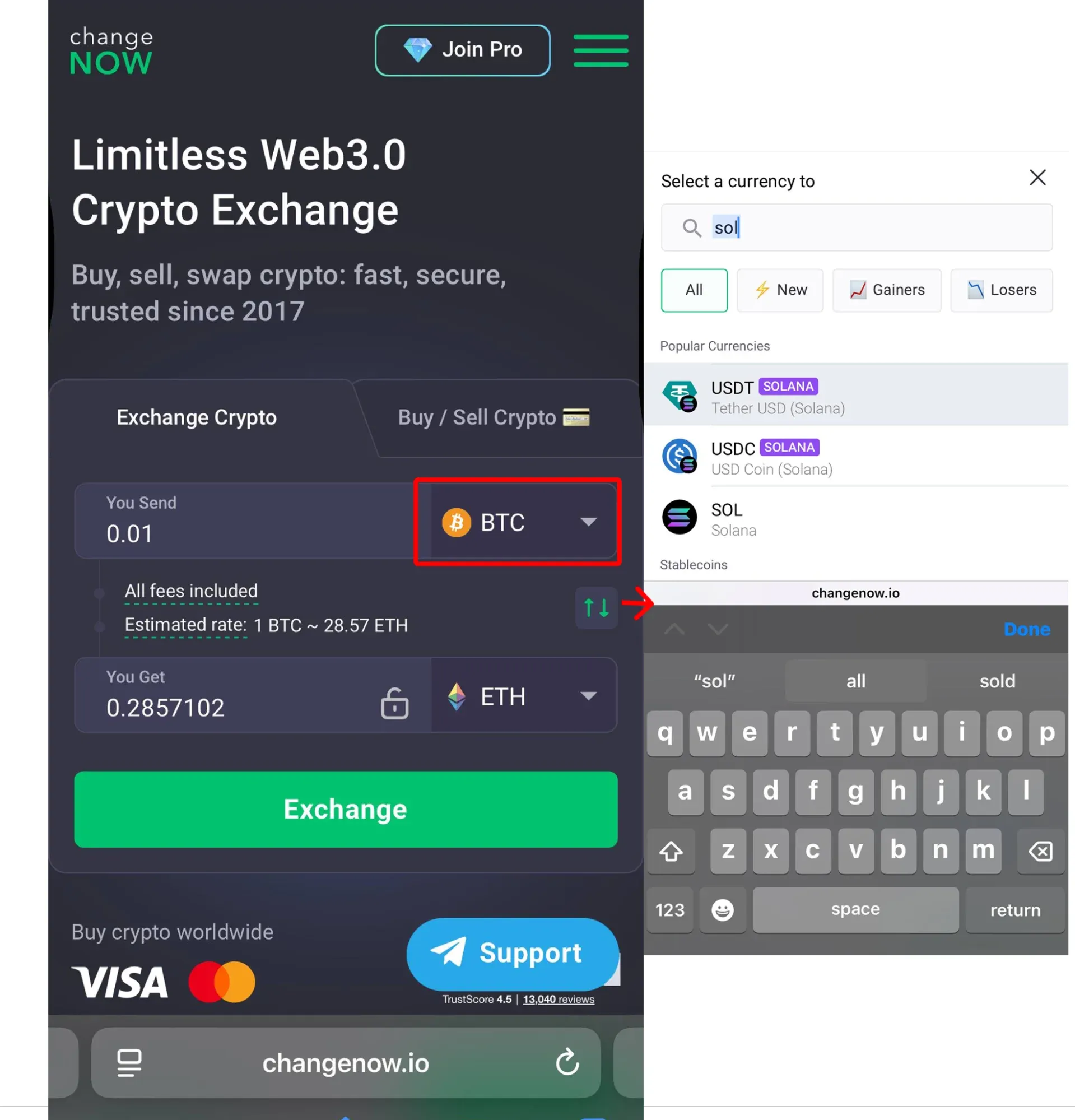
Visit the ChangeNOW website.
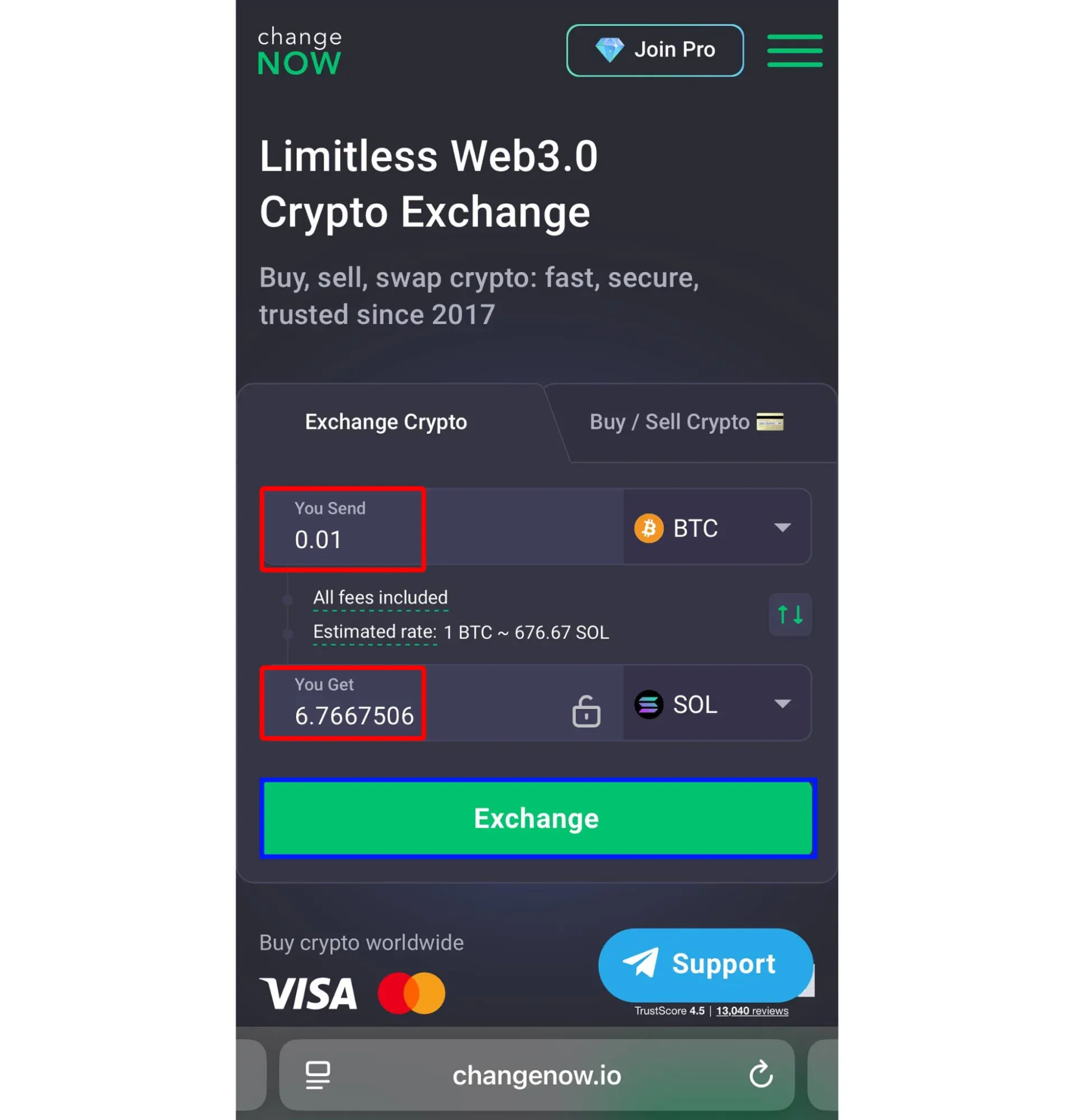
Select the tokens you want to exchange (for example, BTC to SOL) and press Exchange.
Enter the amount you wish to swap and press Exchange.
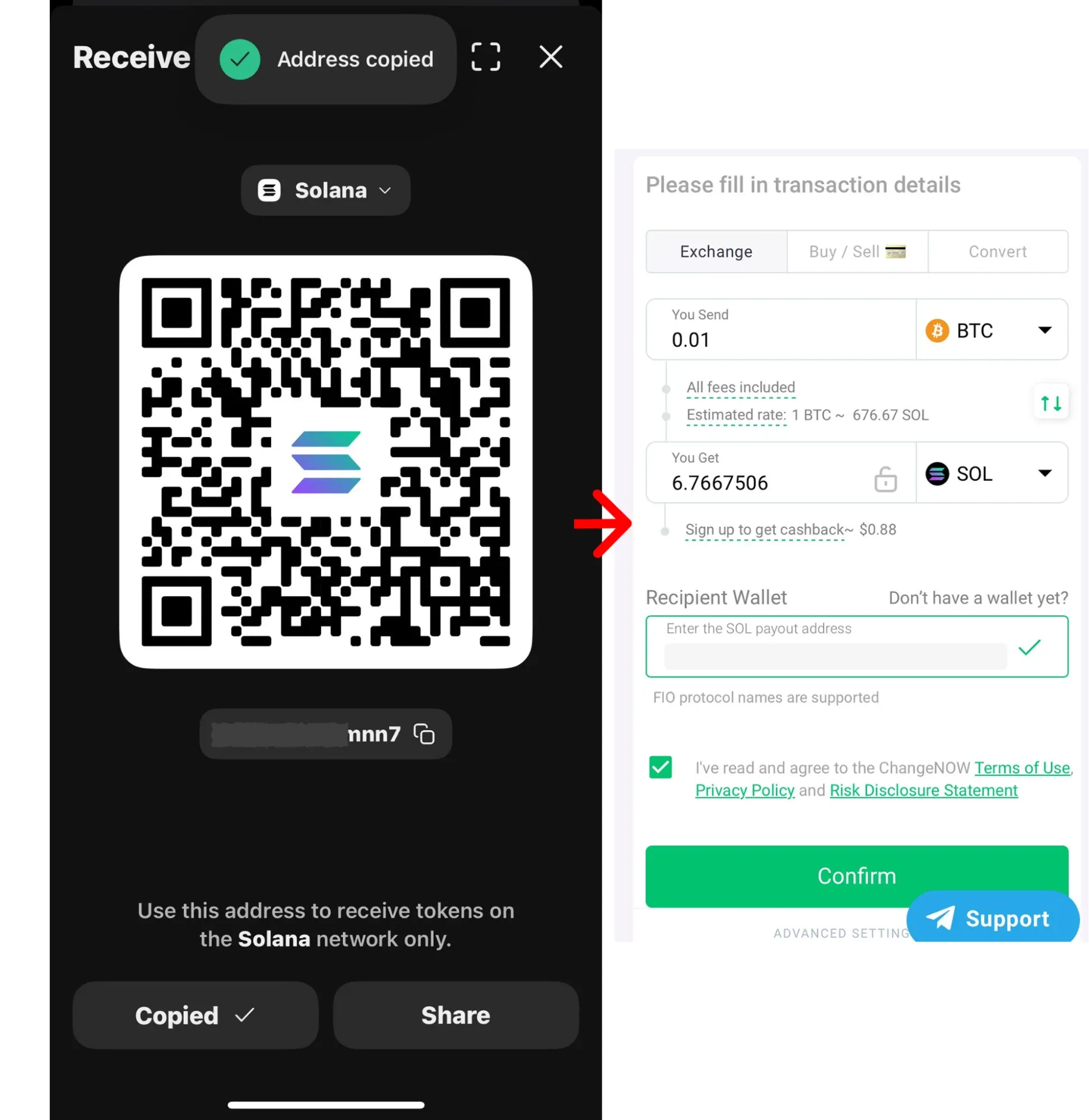
Provide your Phantom Wallet address to receive the funds.
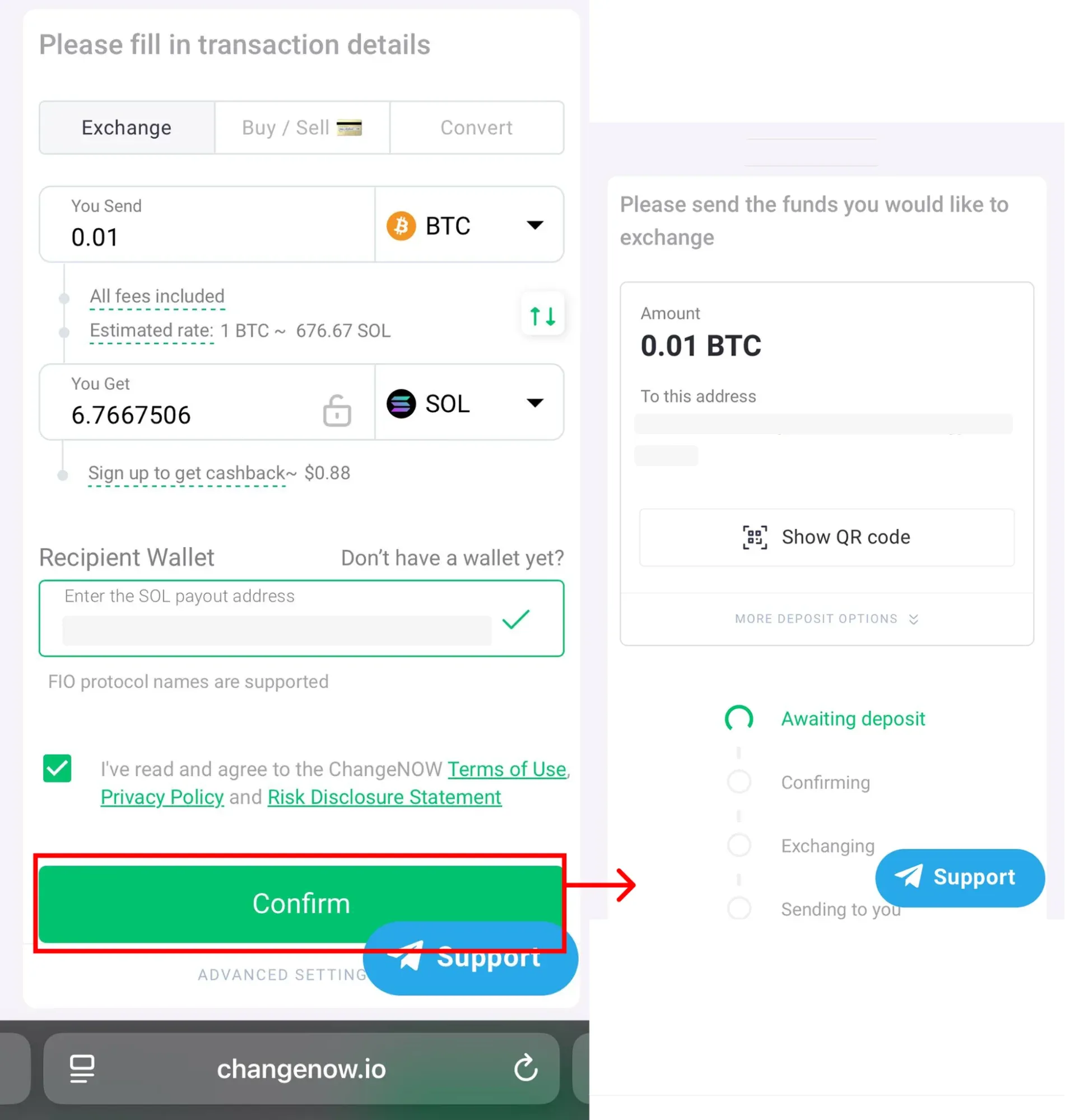
Confirm the transaction and send the funds to the specified address. From there, ChangeNOW will process the exchange quickly and securely.
Why Use ChangeNOW for Cross-Chain Swaps?
Supports multiple blockchains and assets
No mandatory account creation for many swaps
Useful when a specific route is unavailable in Phantom
Fees, exchange rates, and processing times vary depending on network conditions and selected assets.
Common Issues and Troubleshooting
Why Does My Swap Keep Failing on Phantom Wallet?
Insufficient Funds for Fees:
Ensure you have enough of the native network token to cover transaction costs.
Network Congestion:
High network activity may delay or prevent swaps from executing.
Unsupported Tokens or Routes:
Some tokens or cross-chain routes may not be available.
How to Fix High Slippage
Adjust slippage tolerance in Phantom settings
Wait for improved market conditions before retrying
Fees and How to Minimize Them: Phantom vs. External Services
Both Phantom Wallet and external swap services charge fees that vary by network and token pair.
Phantom Wallet Fees
0.85% fee on select swaps
Network transaction fees
Possible bridge fees for cross-chain swaps
External Services (e.g., ChangeNOW)
Rates and fees vary per transaction
Convenience for unsupported cross-chain routes
Tips for Minimizing Fees
Use Solana-based swaps when possible
Avoid swapping during peak Ethereum congestion
Compare final quotes before confirming any cross-chain swap
Conclusion: How to Maximize Your Token Swaps with Phantom Wallet
Phantom Wallet is a powerful and user-friendly option for swapping tokens within supported networks and across certain blockchains. Its in-wallet swaps, transparent fee breakdowns, and self-custodial design make it a strong choice for managing crypto assets.
However, Phantom’s cross-chain functionality is limited to supported routes and networks. When a specific swap is unavailable, external services can help bridge the gap.
By understanding Phantom’s capabilities and limitations, users can choose the most efficient and cost-effective way to swap their tokens.
FAQ
Does Phantom Wallet support Bitcoin?
Yes. Phantom supports native Bitcoin for storage, sending, receiving, and participation in certain cross-chain swaps.
Can I swap BTC directly inside Phantom Wallet?
Phantom supports BTC in some cross-chain swap routes, but not all BTC swap combinations are available.
How do I send funds from Phantom Wallet?
Use the Send button, enter the recipient’s address, and confirm the transaction.
Why is my swap failing?
Common reasons include insufficient fees, network congestion, or unsupported routes.
What is Phantom Wallet’s swap fee?
Phantom charges a 0.85% fee on select swaps, plus applicable network and bridge fees.
Can Phantom swap BTC to SOL?
This may be available depending on supported routes. If unavailable, an external swap service may be required.
Can I swap ETH to SOL in Phantom?
Phantom supports certain cross-chain swaps, but availability depends on routing and network support.