


To open a crypto wallet, choose between a self-custody wallet, where you hold the keys, and a custodial one, where a provider does. Then download the app from the official source, create a new wallet, write down the recovery phrase (seed phrase), set a PIN and biometrics, and add funds. The whole setup takes a few minutes, but the way you back up your wallet decides whether you keep access to your money.
Key Takeaways
- A wallet opens in a few minutes, and you don't need any technical skills.
- There are two paths: self-custody, where the keys are yours, and custodial, where the provider holds them.
- Write your recovery phrase down by hand and keep it offline; never show it to anyone.
- After creating the wallet, send a small test transfer and double-check the network before moving the full amount.
What Is a Crypto Wallet and How Does It Work?
A crypto wallet is a tool that stores the keys giving you access to your crypto, not the coins themselves. The coins live on the blockchain, and the wallet proves they are yours and lets you move them.
Four things are worth knowing before you create one:
- Public address. The string of characters you share to receive crypto, similar to a bank account number.
- Private key. The secret that authorizes every transaction. Whoever has it controls the funds.
- Recovery phrase. A list of words that can restore your private keys if you lose your device. Most self-custody wallets use one, and it is your backup.
- Blockchain. The public ledger where balances are recorded, and where your transfers are confirmed.
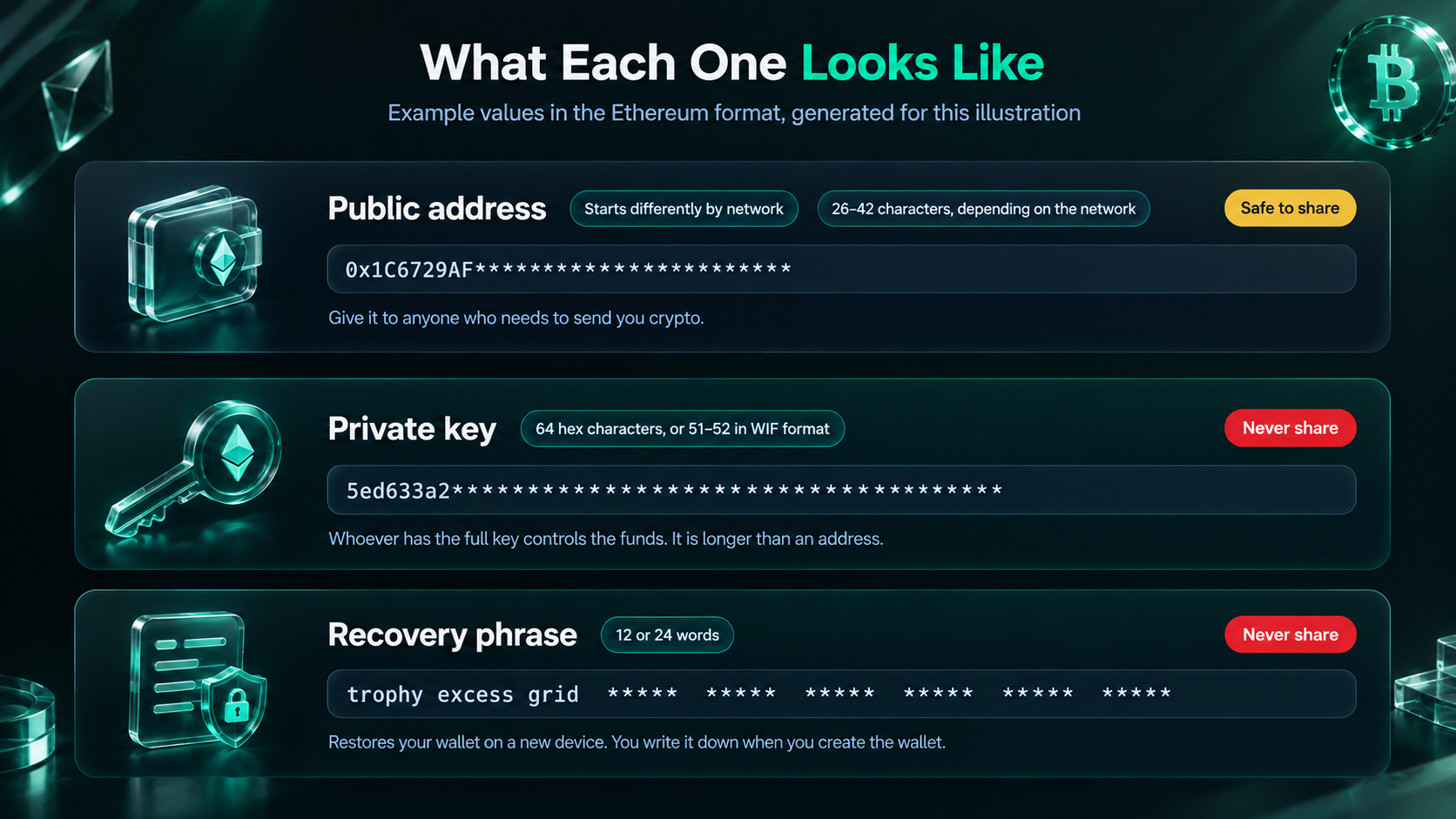
When you send crypto, the wallet signs the transaction with your private key, and the network checks the signature before it updates the balances.
What Types of Crypto Wallets Can You Open?
Crypto wallets can be classified by who controls the private keys (custodial vs. self-custody) and how those keys are stored (hot vs. cold wallets).
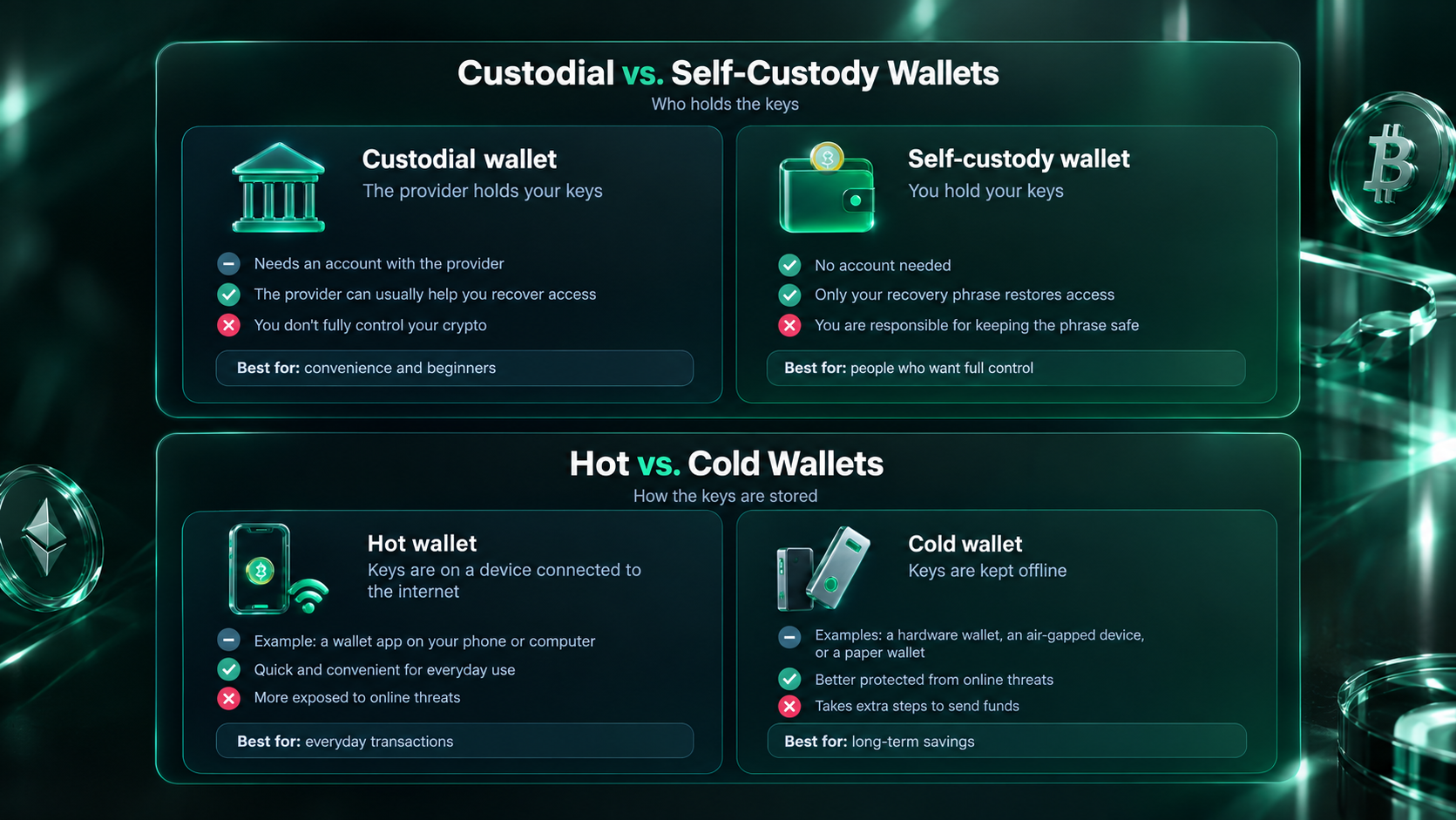
We compare the two custody models in detail in our guide to custodial vs non-custodial wallets, and hot vs cold wallets have a separate breakdown, if you want to dive into more details.
What Do You Need Before You Open a Crypto Wallet?
You need a smartphone or a computer, a stable internet connection, pen and paper for the recovery phrase, and five quiet minutes with nobody looking at your screen. No technical skills are required: if you can install an app, you can open a wallet.
It also helps to decide in advance what you want to do with it. Holding crypto long term, buying it with a card, earning rewards by staking, and using decentralized apps all call for slightly different wallets, and that choice is easier to make before you start. If you're not sure which one you need, choose a wallet that covers the widest range of features, such as NOW Wallet, which can handle all of the above in one app.
How Do You Open a Crypto Wallet Step by Step?
How to Open a Non-Custodial Wallet
Below, we go through the process in NOW Wallet, a non-custodial multi-chain wallet. Most self-custody apps follow the same order, so the steps will look familiar elsewhere.
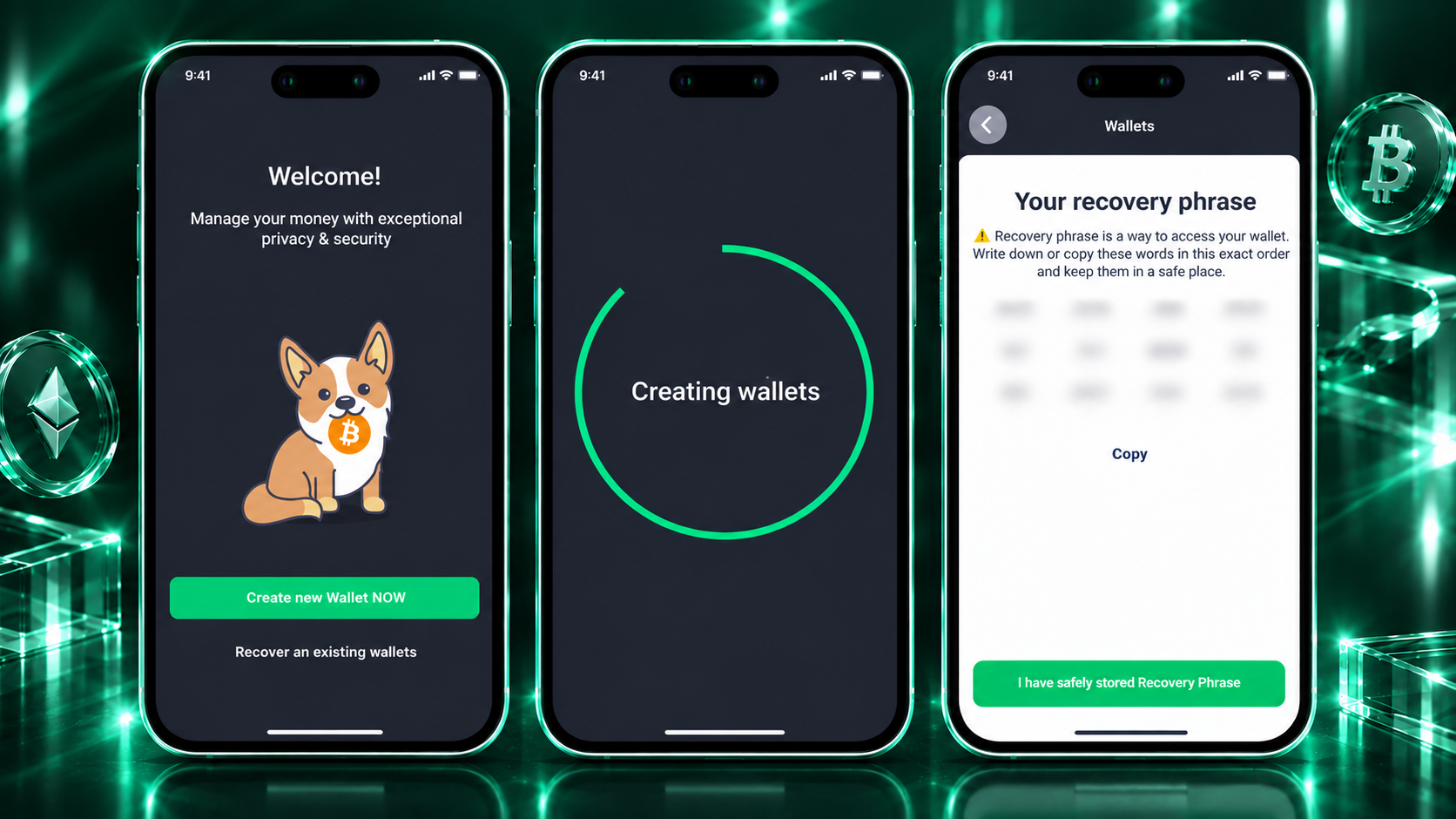
- Download the app from an official source. Start from the website and follow the link for your device, then check the developer's name before installing: fake wallet apps with near-identical names do appear in app stores.
- Create a new wallet. Choose "create" (or "recover" if you want to import a wallet you already have). The app generates your keys on your device.
- Write down and confirm your recovery phrase. Write the words on paper in the exact order shown, then confirm them when the app asks. Skip screenshots and notes apps: anything stored on a connected device can be reached by someone else.
- Set a PIN and turn on Face ID. In NOW Wallet, they protect entry to the app and confirm your transactions, so your funds have an extra barrier even if someone gets hold of your phone. Avoid birthdays and repeated digits.
How to Open a Hardware Wallet or a Custodial Wallet Instead
For a hardware wallet, buy the device from the manufacturer's own store and follow the setup on its screen. The device generates the seed phrase itself, so never use one that arrives pre-written in the box. Our guide on where to buy a hardware wallet explains why the purchase channel matters.
For a custodial wallet, register with the provider and protect the account with a strong password and any extra login protection it offers. The provider holds the keys, so access to your funds depends on that account.
Can You Make a Crypto Wallet Without ID?
Yes, a self-custody wallet doesn't need ID or personal documents. You install the app, create the wallet, and keep the keys yourself, which is how NOW Wallet works, for example. A custodial wallet is different: whether it asks for documents depends on the provider.
One related detail: buying crypto with a bank card inside a wallet goes through third-party providers, and those providers set their own requirements. That is separate from opening the wallet itself.
How Do You Back Up a Crypto Wallet?
The recovery phrase is the backup. Write it on paper, or engrave it on metal if you want something that survives fire and water, and keep it somewhere private and offline. Many people keep two copies in different places, so that one lost or damaged copy doesn't cost them the wallet.
Keep it off every connected device: no screenshots, no cloud notes, no messages, no email. Seth, COO at Cake Wallet, explained why during ChangeNOW's X Space on self-custody:
"Anyone with that seed phrase ultimately becomes a custodian of those funds, because they can move them without you having any ability to stop it."
For storage methods and mistakes to avoid, see our guide on how to store a seed phrase securely.
How Do You Add Money to a New Crypto Wallet?
There are two ways to fund a new wallet: send crypto from another wallet or an exchange, or buy it inside the app. NOW Wallet lets you buy crypto with a bank card or bank transfer through partner providers.
To receive crypto from elsewhere:
- Open the asset you want to receive and copy your wallet address.
- Select the same network the sender will use. Funds sent on the wrong network can be lost, and recovering them is often impossible.
- Send a small test amount first and wait for it to arrive.
- Send the rest once the test transfer has landed.
If you move USDT on Tron, GasFree USDT in NOW Wallet lets you send TRC20 USDT without buying or holding TRX for fees.
How Do You Keep Your New Crypto Wallet Secure?
Keep it secure with a few habits that take little effort once they are routine:
- Install wallet apps only from official sources, and recheck the developer's name before updating.
- Treat unexpected links, messages, and "support" accounts as phishing until proven otherwise.
- Never give your seed phrase to anyone: no real support team will ask for it.
- Protect the app with a PIN and biometrics.
- Keep the app updated, and follow the wallet's official website and social channels, so you hear about security news and updates first.
For a deeper look, read our guide to crypto wallet security best practices.
What Is the Best Crypto Wallet for a Beginner?
The best beginner wallet is the one you will set up correctly and keep using. A wallet is likely to suit you if it meets these conditions:
- It walks you through setup. The app guides you step by step, without assuming you know the jargon.
- Protection is part of daily use. A PIN and biometrics guard the app, so staying safe doesn't take extra effort.
- It supports what you plan to hold. The assets and networks you want are covered now, so you won't need to switch wallets when your plans grow.
- Fees are visible. The wallet shows network and service fees before you confirm a transaction.
Which Wallet Is Best If You Want Full Control?
If you want your keys to stay with you, choose a non-custodial wallet such as NOW Wallet. The interface is simple, and the wallet doesn't ask for ID. Your private keys and recovery phrase stay on your device, with biometrics guarding access. You can also create multiple wallets for different purposes. With 70+ blockchains and 1500+ tokens supported, one app can cover everything a beginner needs.
Which Wallet Is Best If You Are Afraid of Self-Custody?
If holding your own keys feels like too much responsibility, start with a well-known custodial service. You trade some control for convenience, because the provider holds the keys and can often help you regain access to your account. Our guide to the best crypto wallets lists options to compare.
If the idea of holding your own keys is the only thing holding you back, Seth, COO at Cake Wallet, offered a useful perspective in the same X Space:
"Keeping a secret safe is something we're all doing all the time with how we use the internet. […] It's not something that novel. It's 12 words. You can keep 12 words safe."
Conclusion
Opening a wallet is quick and mostly mechanical. What separates a safe setup from a risky one is how you back up your recovery phrase and whether you test a small transfer first. Pick the custody model that fits you, save the phrase offline, and the rest is easy to learn as you go.