Cryptojacking is the unauthorized use of someone else's computer, server, mobile device, or cloud infrastructure to mine cryptocurrency.
Unlike ransomware, cryptojackers don’t announce their presence or demand payment. Attackers keep the mining operation running unnoticed for as long as possible.
Victims experience slower devices, overheating, higher electricity bills, and unexpected cloud charges. It can affect both individuals and businesses (cloud service providers for example).
In this guide, you'll learn how cryptojacking works, how to spot and stop it.
How Does Cryptojacking Work?
A cryptojacking attack typically involves five stages.
Step 1: Initial Access
Attackers first find a way to access the target system.
In 2023, Sysdig researchers discovered the SCARLETEEL attack, in which hackers exploited vulnerable Kubernetes containers and gained administrator access. They then launched 42 cloud instances for cryptocurrency mining, potentially costing the victim over $4,000 per day if left unchecked.
Step 2: Miner Execution
Once access is established, the attacker runs cryptocurrency mining software.
The miner uses the device's central processing unit (CPU) or graphics processing unit (GPU) to do calculations for a proof-of-work blockchain.
It can use installed malware or execute mining scripts inside web browsers.
Step 3: Persistence and Evasion
Attackers try to hide the miner and keep it running. It may look like a normal program, restart on its own, or use less computer power when the device is in use.
FAQ
Crypto malware is a broad term that can refer to malicious software targeting cryptocurrency assets or related systems. Examples are clipboard hijackers and cryptojacking malware.
Monero (XMR) uses a CPU-friendly proof-of-work algorithm called RandomX, allowing mining on ordinary computers. Its transaction privacy features also make it harder for outside observers to trace payments. These characteristics make Monero attractive to some cryptojacking operators. XMRig, a legitimate open-source miner, is sometimes misused in this kind of attacks.
CISA's broader cybersecurity guidance supports practices relevant to cryptojacking prevention, including timely patching, multifactor authentication, strong credential security, secure configurations, and restricted administrative access. Organizations should also review exposed services and access permissions. These measures reduce opportunities for attackers to compromise computing resources.
Yes, cryptojacking involves unauthorized access to or fraudulent use of computing resources, so it is illegal. In the United States, such activities violate the Computer Fraud and Abuse Act (CFAA), wire fraud laws, or state computer crime laws. Depending on the circumstances, offenders may face fines, imprisonment, or civil liability. However, not every unauthorized use of company equipment automatically constitutes a criminal offense.
Yes. Unauthorized access and computer damage still violate applicable laws even when no wallet funds or personal information are stolen.
Yes. Charles O. Parks III pleaded guilty to wire fraud in a cloud cryptojacking scheme and was sentenced in 2025. Another case involved Paige Thompson, who was convicted in 2022 of federal offenses related to cloud intrusions, data theft, and unauthorized cryptocurrency mining.
The infected device connects to a mining pool, where computers work together to mine cryptocurrency. It receives mining tasks and sends the results back to the pool.
Step 5: Attacker Profit
The attacker receives the mining rewards, while the victim pays for the electricity and computing resources.
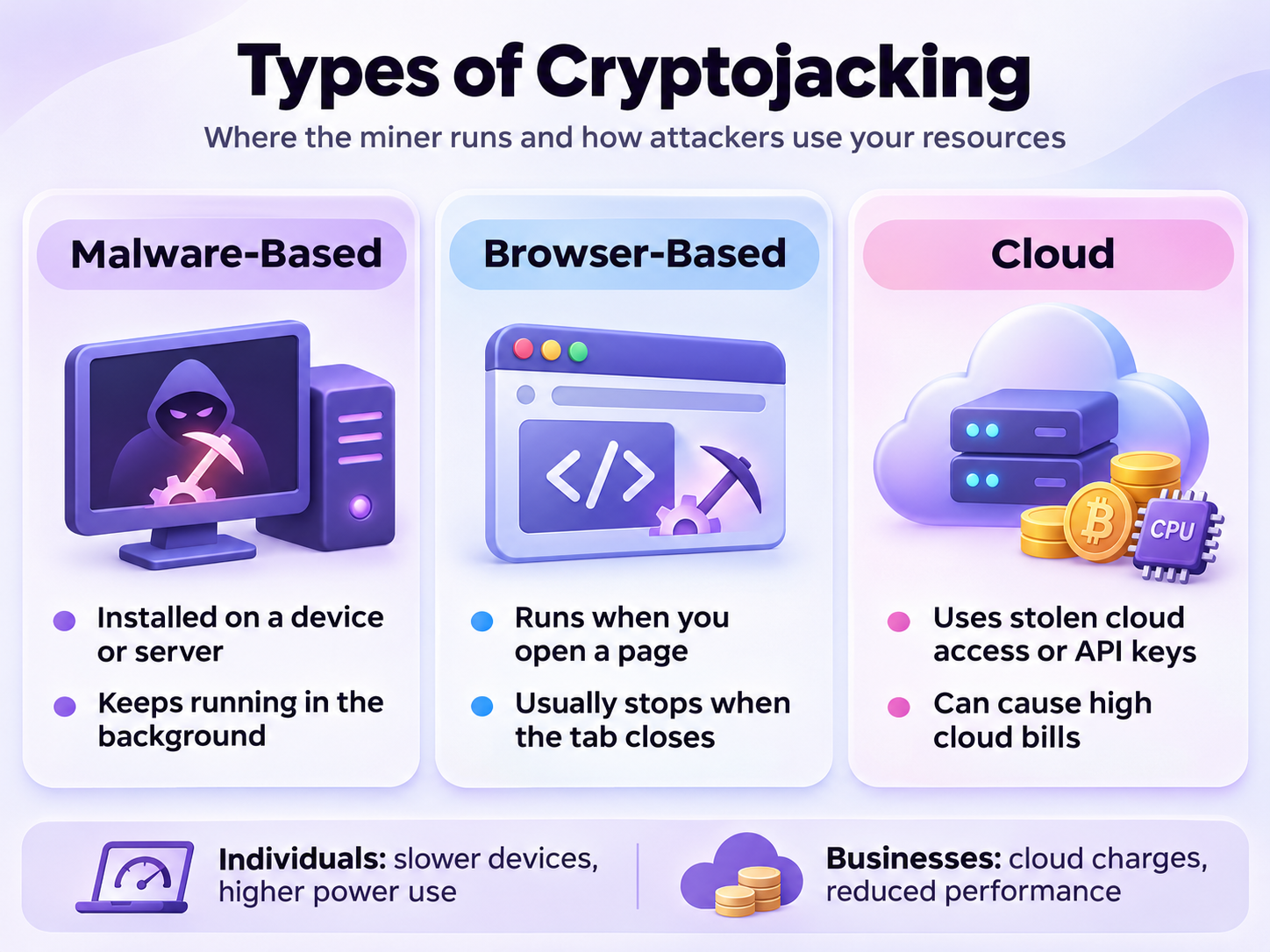
Cryptojacking attacks differ depending on where mining software runs and how attackers gain control of computing resources.
Malware-Based Cryptojacking
Attackers install mining malware through malicious software. The malware runs in the background and can keep mining even after you close your browser or restart your device.
Browser-Based Cryptojacking
Attackers hide mining scripts on websites or in ads. When you open an infected page, the script uses your device to mine cryptocurrency without your permission. This is called drive-by mining. Mining usually stops when you close the tab.
One well-known example is Coinhive, a browser mining service launched in 2017. Hackers often added its mining script to websites without visitors' permission. Coinhive shut down in March 2019.
Cloud Cryptojacking
Attackers use stolen passwords, API keys, or security weaknesses to access cloud services and mine cryptocurrency. They can also target virtual machines, Docker, or Kubernetes systems. The victim may end up paying large cloud bills.
How to Detect Cryptojacking
Cryptojacking is often hard to notice as miners run in the background. But these signs should feel like a red flag.
Signs of Cryptojacking
Warning sign
Possible explanation
How to check
Slow performance
Mining consumes CPU or GPU resources
Compare performance during normal activity
High CPU/GPU usage
An unknown process continuously performs calculations
Check Task Manager or Activity Monitor
Overheating
Sustained processing generates additional heat
Monitor temperatures and fan activity
Battery drain
Mining increases power consumption
Review battery usage
Unknown processes
Malware may disguise itself as legitimate software
The main warning is sustained resource usage without an obvious explanation.
Cryptojacking can also affect smartphones and routers. On phones, warning signs include fast battery drain, overheating, and slow performance. You can check battery usage and running apps in your device settings.
How to Detect Cryptojacking on a Computer
On Windows, open Task Manager and sort running processes by CPU or GPU usage.
On macOS, open Activity Monitor and check the CPU tab.
On Linux, open the terminal and run top or htop to check CPU usage. Look for unknown processes that use a lot of resources, even when the server is idle.
Look for unfamiliar applications that continuously use significant processing power, especially when the device should be idle.
If you find suspicious activity:
Check the process name and file location.
Review recently installed applications.
Inspect startup programs and scheduled tasks.
Run a full scan using updated security software.
Check whether the suspicious process reappears after restarting.
Do not delete every unfamiliar system process without investigating them first – this might be legitimate.
How to Detect Browser Cryptojacking
If you suspect a website is mining cryptocurrency through your browser, compare CPU usage with the page open and closed. A significant decrease after closing the tab may indicate that the page was consuming substantial resources.
You can also review browser extensions, inspect the browser's task manager, and check for unusual background activity. Website administrators can use developer tools to investigate unexpected JavaScript execution and suspicious network connections.
High CPU usage alone is not proof of browser mining.
How Organizations Can Detect Cryptojacking
Businesses need broader monitoring across employee devices and cloud infrastructure.
Common detection methods include endpoint detection and response (EDR), network traffic monitoring, security logs, and cloud activity analysis.
Security teams should investigate unexpected virtual machines, unusual CPU or GPU consumption, suspicious mining-pool connections, and unauthorized changes to cloud accounts.
Billing alerts can also help identify attacks before costs become substantial.
How to Stop Cryptojacking
Stopping a cryptojacking attack requires both terminating the mining process and making sure the attacker doesn't have access to your device.
Identify and Isolate the Affected System. Start by identifying the suspicious process or workload responsible for abnormal resource usage. If there is strong evidence of compromise, disconnect the affected device or workload from the network when safe to do so.
Remove the Mining Malware. Run an updated antivirus or endpoint protection scan. Remove confirmed malicious applications, browser extensions, or mining components using trusted security tools.
For cloud environments, identify unauthorized virtual machines or containers and terminate them after preserving necessary evidence.
Check for Persistence. Some cryptojacking malware is designed to restart automatically. Check startup programs, scheduled tasks, system services, and other mechanisms that may relaunch the miner.
Secure Accounts and Fix Vulnerabilities. If credentials may have been compromised, revoke affected sessions, rotate passwords and API keys, and enable multifactor authentication. Update vulnerable software and correct any insecure configurations that allowed the attacker to gain access.
Check for Additional Threats. Cryptojacking may be part of a broader security breach. Investigate whether the attacker installed other malware, accessed sensitive information, or created unauthorized accounts.
Monitor for Recurrence. After remediation, continue monitoring resource usage and network activity. If suspicious mining activity returns, the original access point or persistence mechanism may still be present.
How to Prevent Cryptojacking
Cryptojacking prevention focuses on securing access to computing resources.
Protecting Personal Devices
Individual users can reduce exposure by following basic cybersecurity practices:
Use trusted security software. Enable real-time protection and update threat definitions.
Avoid suspicious downloads. Install applications from verified sources rather than unknown websites.
Review browser extensions. Remove unnecessary or suspicious extensions.
Enable multifactor authentication. Protect accounts against unauthorized access.
Be careful with phishing messages. Avoid opening unexpected attachments or downloading unfamiliar files.
Consider trusted content blockers. Some tools can block known malicious scripts.
Monitor resource usage. Investigate unexplained CPU activity, overheating, or rapid battery drain.
These measures also help protect against many other types of malware.
Protecting Business and Cloud Infrastructure
Organizations should combine endpoint protection with secure cloud configurations and centralized monitoring.
Enforcing least-privilege access controls
Protecting API keys and other credentials
Enabling MFA for privileged accounts
Patching vulnerable servers and applications
Restricting exposed administrative interfaces
Monitoring cloud audit logs
Setting resource usage and billing alerts
Scanning container images for malicious components
Monitoring unexpected virtual machines and workloads
Maintaining incident response procedures
Cloud administrators should also review account permissions regularly. Excessive privileges can allow a compromised account to create or manage computing resources beyond what its legitimate tasks require.