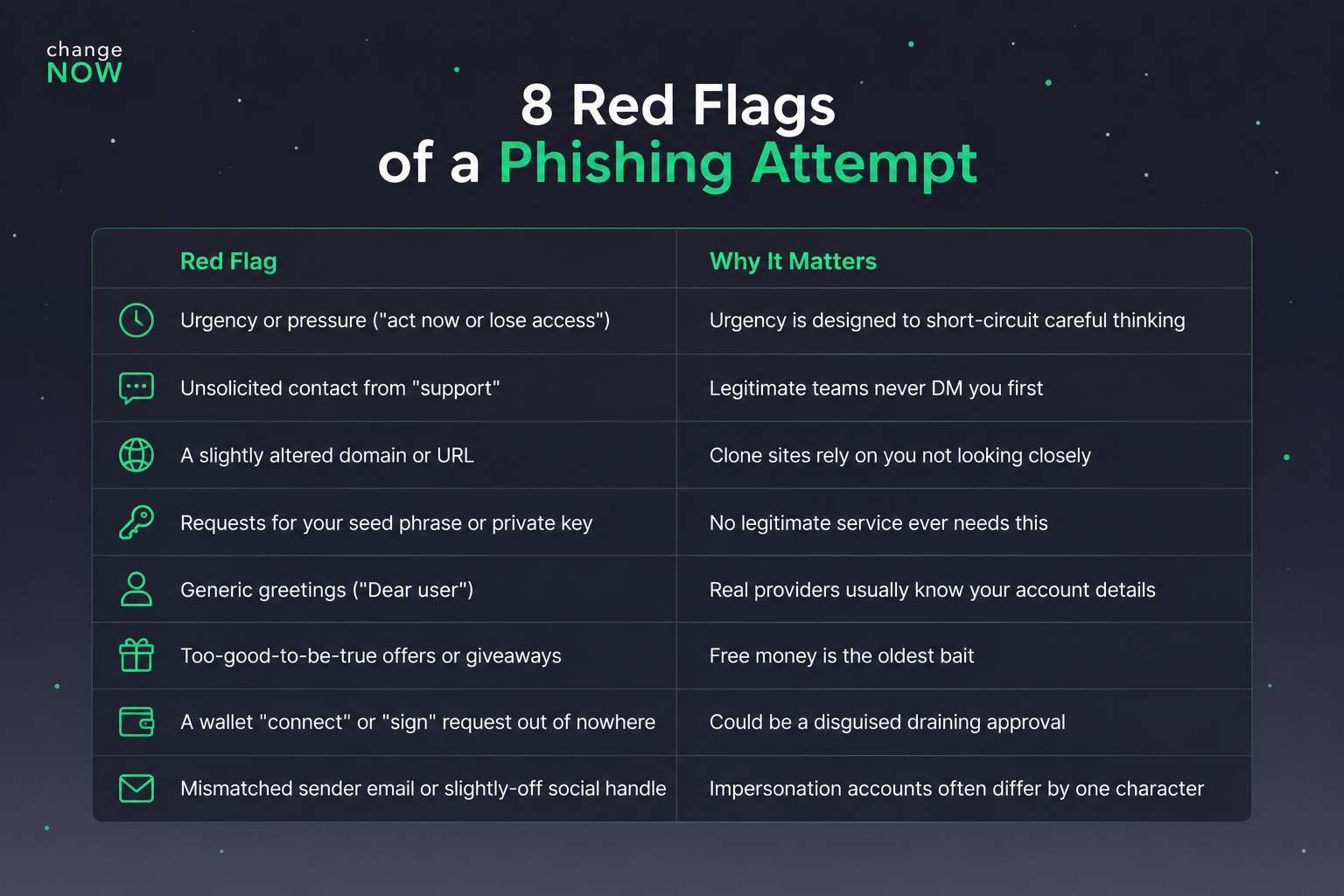
Quick answer: Crypto phishing is when a scammer impersonates a trusted service to trick you into handing over sensitive data. You avoid it by never clicking links sent to you, always navigating to services through bookmarks, never sharing your seed phrase, enabling two-factor authentication through an app (not SMS), and pausing before you act on anything urgent.
Key Takeaways
Attackers rely on urgency and familiarity. Slowing down defeats most attacks outright.
Never type your seed phrase into any site you reached by clicking a link.
Bookmark every service you use regularly and only ever access it through it.
No legitimate support team will ever DM you first or ask for your recovery phrase.
Phishing is a form of social engineering in which an attacker poses as a legitimate organization, a crypto exchange for example, to convince you to hand over sensitive information.
It relies on you clicking, typing, or approving something you shouldn't. In crypto, that single click can move funds instantly and irreversibly. Which is exactly why it has become the dominant attack against individual holders.
Chainalysis estimates roughly $17 billion was stolen through crypto scams and fraud in 2025, with crypto phishing attacks growing about 1,400% year-over-year [1].
How to Spot and Avoid Phishing Scams
Crypto phishing detection takes practice, but once you know what to look for, most attempts become obvious at a glance.
1. Never click a link that was sent to you.
If an email or DM points you to a service, don't click it. Open a new tab and type the address yourself.
Some experienced traders take this further:
"I always type the URL myself, or open the service on a device that has no access to any of my personal accounts," advises BlockchainRACER in our dialogue about crypto safety tips.
2. Bookmark every important service and only use the bookmark.
"Malicious domains win in the address bar," warns BlockchainRACER.
A single swapped letter or extra character in a domain is nearly invisible when you're clicking out of habit. Save the real URL and always launch the service from that saved link.
3. Slow down, especially when something feels urgent.
"Be boring and don't rush. Three deep breaths before any serious action can save both your money and your nerves, especially when you notice signs of artificial urgency because that urgency is usually the attack itself," – BlockchainRACER advises,
Attackers manufacture time pressure because it works. If something is pushing you to act immediately, treat that pressure itself as the warning sign.
4. Never share your seed phrase or private key.
No platform or support agent needs it. Anyone who asks is attempting to steal your funds.
5. Turn on two-factor authentication, not via SMS.
SMS codes can be intercepted through SIM-swapping. An authenticator app (or a hardware security key) is significantly harder to compromise. Read our deep-dive on why platforms are switching from SMS codes to more secure verification methods.
6. Keep meaningful holdings in a hardware wallet.
Anti-phishing measures in crypto wallets include one important step – cold wallets. Hardware wallets keep your private keys offline, so even if your computer is compromised, your keys never touch it.
7. Verify addresses character by character before sending.
Clipboard-hijacking malware and address-poisoning scams both rely on you pasting or copying without checking. Confirm the first and last several characters of any address match what you expect, every single time. Or even better check the whole address. It takes time but saves money.
8. Only install wallet apps and extensions from official sources.
Check the publisher, read recent reviews, and when possible verify the download link from the project's official website.
9. Treat unsolicited support messages as hostile by default.
If "support" messages you first, especially on Telegram or X, assume it's a scam until proven otherwise through official channels.
10. Share what you find.
If you spot something suspicious, post about it in subreddits, Discord servers, or Telegram groups.
If you come across a copycat site impersonating a real project, take the extra minute to report it to the official team.
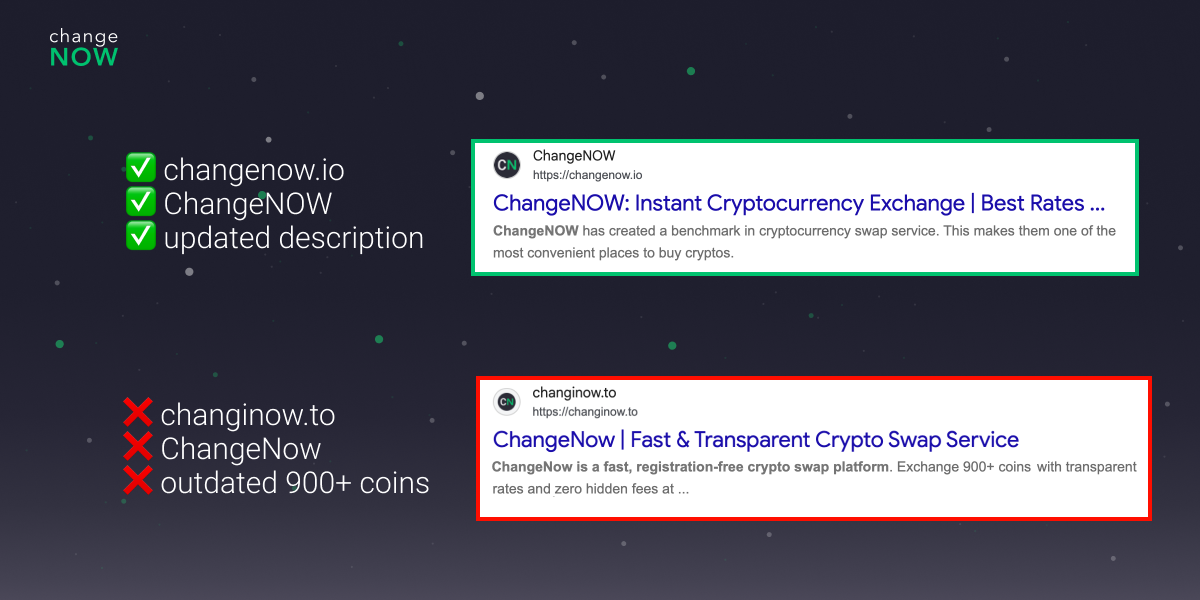
How We Fight Fake ChangeNOW Sites
If you ever run into a site impersonating ChangeNOW, or lose funds to one, reach out to our support team. We treat every report as a priority. Our support will ask a few quick questions to build a full picture of the scam.
From there, two things happen. Any scam addresses you share get added to our internal blacklist. Our AML system can automatically flag and stop them in future transactions, cutting off the scammer's access to other victims. At the same time, our compliance team verifies the fake site and files a complaint with the domain's registrar to get it shut down.
We can't always recover funds already sent to a scammer. But we can make sure they don't get away with it quietly, and that the next person doesn't fall for the same site. If something feels off, don't stay quiet and email us at [email protected]. We will take it from there.
Here's an example of a phishing site:
What to Do If You Already Clicked a Phishing Link
Don't enter any credentials if you haven't already. Close the tab immediately.
If you did enter a password, change it right away on the real site, and change it anywhere else you reused it.
If you approved a wallet transaction or connected your wallet, use a token approval checker to revoke the malicious permission as fast as possible.
Not sure what an "approval" actually is or why it's dangerous? This breakdown explains it well:
If you shared your seed phrase, treat that wallet as fully compromised. Move any remaining funds to a brand-new wallet with a freshly generated seed phrase immediately.
Run a malware scan on the device you used, in case the link also tried to install something.
Yes. Instead of a seed phrase, an attacker can trick you into signing a malicious token approval when you "connect" your wallet to a fake site. It lets them drain approved tokens without even knowing your keys.
No. Modern phishing spreads through fake ads, cloned websites, Telegram and Discord DMs, SMS ("smishing"), QR codes ("quishing"), and phone calls ("vishing")
Check the exact domain spelling character by character, confirm it matches a bookmark you saved previously rather than a search result or link, and look for HTTPS. Though note HTTPS alone doesn't guarantee legitimacy, since scam sites can have it too.
It's when scammers send a tiny transaction from a wallet address deliberately crafted to look almost identical to one you've used before, hoping you'll copy the wrong address from your transaction history the next time you send funds.
It's better than nothing, but an authenticator app or hardware key is safer, since SMS codes can be intercepted through SIM-swapping attacks.