


On July 9, 2026, Hong Kong's Securities and Futures Commission told every licensed crypto trading platform and online broker to stop using SMS, email, and app-based one-time passwords for login. They have 12 months to switch to passkeys, hardware security keys, or cryptographically verified registered devices instead.
This is one of the first times a major financial regulator has banned SMS-style codes outright for an entire industry. It's worth understanding why, because the reasoning applies to every crypto user, not just Hong Kong licensees.
What Hong Kong actually ordered
The SFC's circular targets internet brokers and SFC-licensed virtual asset platforms (VASPs). One-time passwords sent by SMS, email, or generated inside a broker's own app can no longer be used to log clients in or to register a new device.
In their place, the SFC pointed to passkeys, registered devices verified through cryptography, and physical hardware security keys.
SDC had been tightening the rules for years.
| When | What the SFC did |
|---|---|
| September 2020 | First cybersecurity circular for licensed brokers and platforms |
| Ongoing | Pushed firms to join an SMS Sender Registration scheme, so clients could spot spoofed texts |
| Later | Banned clickable links inside SMS messages sent by brokers, after fake sites mimicking licensed firms tricked clients into handing over credentials |
| February 2025 | Circular encouraging firms to retire OTP logins voluntarily |
| July 9, 2026 | New circular making phishing-resistant authentication mandatory, with a 12-month deadline |
The trigger for the final step was concrete.
In 2025, fraudsters ran large SMS phishing campaigns impersonating brokers, sending fake messages that referenced supposed regulatory requests.
Late last year, the SFC had to freeze roughly HK$91 million (about $11.7 million) across four brokers after compromised accounts were used to run unauthorized trades.
HKCERT reported that phishing attacks accounted for 57% of all cybersecurity incidents.
Why SMS, email, and app codes stopped being enough
A one-time code proves that whoever is completing the login can currently read that channel. But it says nothing about whether they're the real account owner. That gap is exactly what attackers exploit
SIM swapping
An attacker convinces or bribes a mobile carrier employee to move your phone number to a SIM card they control. Every SMS code meant for you now arrives on their phone.
Crypto marketer Michael Terpin lost close to $24 million this way:
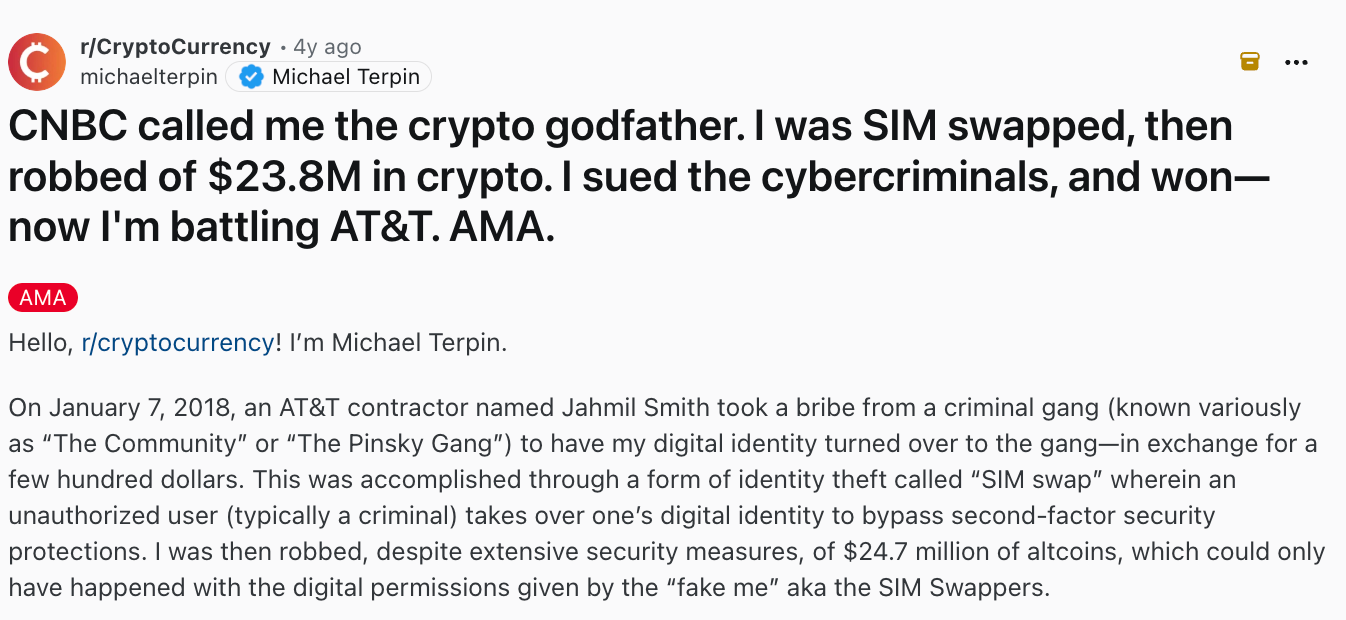
SIM-swap gangs targeting crypto holders have kept operating since, including a case that ended with hacker Joseph O'Connor sentenced to five years in prison for stealing $794,000 through the same method:
Adversary-in-the-middle (AiTM)
Modern phishing kits are more sophisticated.
How real-time phishing proxies work:
- They just wait between you and the real login page, showing you an exact copy of it.
- You type your password, the kit forwards it to the genuine site
- The genuine site asks for your OTP code, you type that.
- The kit captures the resulting logged-in session before you notice anything wrong.
This works against SMS codes, email codes, and authenticator-app codes equally well, because it steals the session after you've already proven who you are.
An interesting Reddit case where a user shared how their organization became the target of an AiTM phishing attack:
Malware and SMS interception.
Some malware reads incoming SMS messages and forwards OTP codes to an attacker in the background, with no visible sign on your phone.
Unlike traditional phishing, this method does not require the user to manually share the code, the malware intercepts it automatically.
A Reddit discussion highlighted the risks of SMS-based OTP:
Social engineering
Social engineering attacks rely on manipulating people without exploiting technical vulnerabilities. They can take many forms: phishing emails, fake support calls (vishing), SMS scams (smishing), impersonation, and other tactics. All they are designed to create a sense of urgency or trust.
A common example is a fake "support agent" who contacts a victim, warns them about suspicious activity, and asks them to share a verification code "to confirm their identity."
They target the human step in the authentication process, where a convincing message, website, or phone call can trick users into revealing sensitive information.
A real-world example comes from ChangeNOW's case, where the team helped recover $2.5M lost in a social engineering attack with the assistance of U.S. agencies. Highly recommend reading after you finish this article.
Comparing authentication methods
| Method | How you prove it's you | Can be phished? |
|---|---|---|
| Password only | Something you know | Yes, trivially |
| SMS one-time code | Code sent to your phone number | Yes, via SIM swap, malware, or a proxy site |
| Email one-time code | Code sent to your inbox | Yes, especially if email itself has weak security |
| Authenticator app (TOTP) | Code generated locally on your device | Yes, via a real-time proxy site |
| Push notification approval | Tap "approve" on your phone | Yes, via proxy sites, and via "prompt bombing" |
| Passkey (FIDO2/WebAuthn) | Cryptographic key pair tied to the real website's domain | No, the credential simply won't work on a fake domain |
| Hardware security key (e.g. YubiKey) | Physical device holding a cryptographic key | No, same domain-binding protection, plus the key never leaves the device |
The last two rows are what regulators mean by "phishing-resistant." Everything above them can be phished by someone patient enough, because they all rely on a human copying a secret from one place to another.
What is phishing-resistant authentication
Passkeys and hardware keys are both built on the same open standard, FIDO2 (also called WebAuthn).
When you set up a passkey for an account, your device generates two mathematically linked keys:
- a private key that never leaves your device (often stored in a secure chip)
- a public key that gets sent to the website.
To log in, the website sends a challenge, your device signs it with the private key, and the website checks the signature against the public key it already has. Nothing you type or is involved.
The part that actually prevents phishing is domain binding. The signature your device produces is tied to the exact domain that requested it. If you land on "changen0w" instead of the real site, your device checks the domain, sees it doesn't match what the passkey was registered for, and simply refuses to respond. It doesn't matter how convincing the fake page looks.
Hardware security keys work the same way, with one added benefit: the private key lives on a small physical device (a USB or NFC key like a YubiKey). It looks just like a USB flash device.
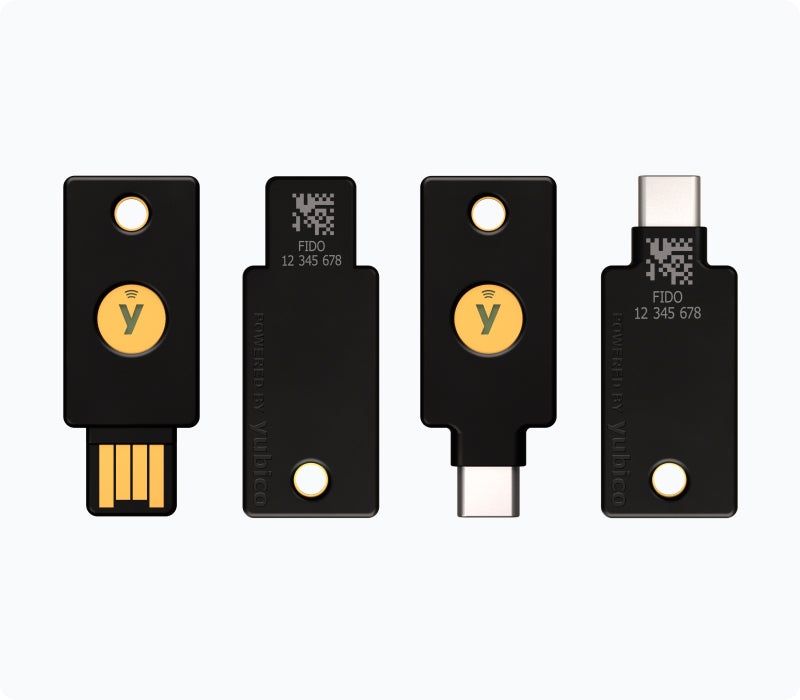
That makes them the strongest single option for high-value accounts, since even malware on your computer can't extract the key.
The trade-off: new risk, not zero risk
Phishing-resistant authentication doesn't remove risk from the system, it relocates it, says Elias Vilochkin, Chief Product Officer at ChangeNOW.
"You're trading one attack surface for another," Vilochkin says. "With passkeys and hardware keys, you're now trusting that the vendor's implementation has no vulnerabilities, and that they won't introduce one in a future firmware update. That has to be actively monitored, because it puts even users who were never personally vulnerable to phishing or social engineering at risk."
The second issue, he points out, is concentration. Any specialized security hardware becomes a more attractive, more targeted asset. Hardware wallets, hardware access keys, and similar devices are exactly the kind of thing a sophisticated attacker will go after directly, whether through a supply-chain compromise, physical theft, or an exploit in the device itself.
"It's not that this makes things worse than SMS," Vilochkin adds. "It's that it closes off one large, easy category of attack and opens a smaller, higher-value one. That's a new category of risk, not the absence of one."
SIM swaps, AiTM proxies, and malware-based SMS interception remain far more common and far easier for an average attacker to pull off than compromising a FIDO2 implementation or stealing a physical device. It's a reason to treat the switch as a change in what you need to watch for, not a one-time fix you can forget about.
With that in mind, here's what actually reduces your exposure today.
How to protect your accounts today
You don't need to wait for a regulator to force your exchange's hand. Most of these steps are things you can (and really should) do right now.
- Turn on a passkey wherever it's offered. Check your exchange, your email provider, and any wallet app that supports one. This alone removes you from the pool of people a phishing kit can succeed against.
- Use a hardware security key for your most important accounts. That means your primary email (since it's usually the recovery path for everything else) and any exchange holding meaningful funds.
- Never click links in unsolicited texts or emails, even ones that look like they're from your exchange. Type the address in yourself.
- If your only option is an authenticator app, use that over SMS. It's not phishing-proof, but it removes SIM-swap risk.
- Never read a one-time code to anyone on a phone call, no matter who they claim to be. Legitimate support staff never need it.
- Check and revoke old token approvals on wallets you've connected to dApps. An old "unlimited spend" approval to an abandoned project is a standing risk even if you never interact with it again.
- Keep meaningful crypto holdings in a cold wallet. A cold wallet can't be drained by a malicious signature request it never sees.
- Watch for the domain, not the design. Phishing pages copy layouts perfectly. They can't copy the actual registered domain your passkey or bookmark points to.
Conclusion
SMS codes will likely be an option for low-stakes accounts for a while yet, because they're cheap and familiar. But for anything holding real money, crypto included, it's not safe. if a login step can be read out loud or forwarded by a fake page, it's eventually going to be treated as a legacy risk.


