


A single letter can be enough to send your crypto to the wrong place.
In May 2025, SlowMist reported that a crypto user lost more than $20,000 after visiting a phishing website impersonating ChangeNOW. According to the security firm, the user reached the fake site through a Chrome browser recommendation. The domain looked legitimate at first glance, but one character was different.
The attackers had used a lookalike character in the domain name, creating a lookalike domain in a technique commonly associated with Punycode phishing. This type of crypto phishing attack can make a fake website appear almost identical to the legitimate service.
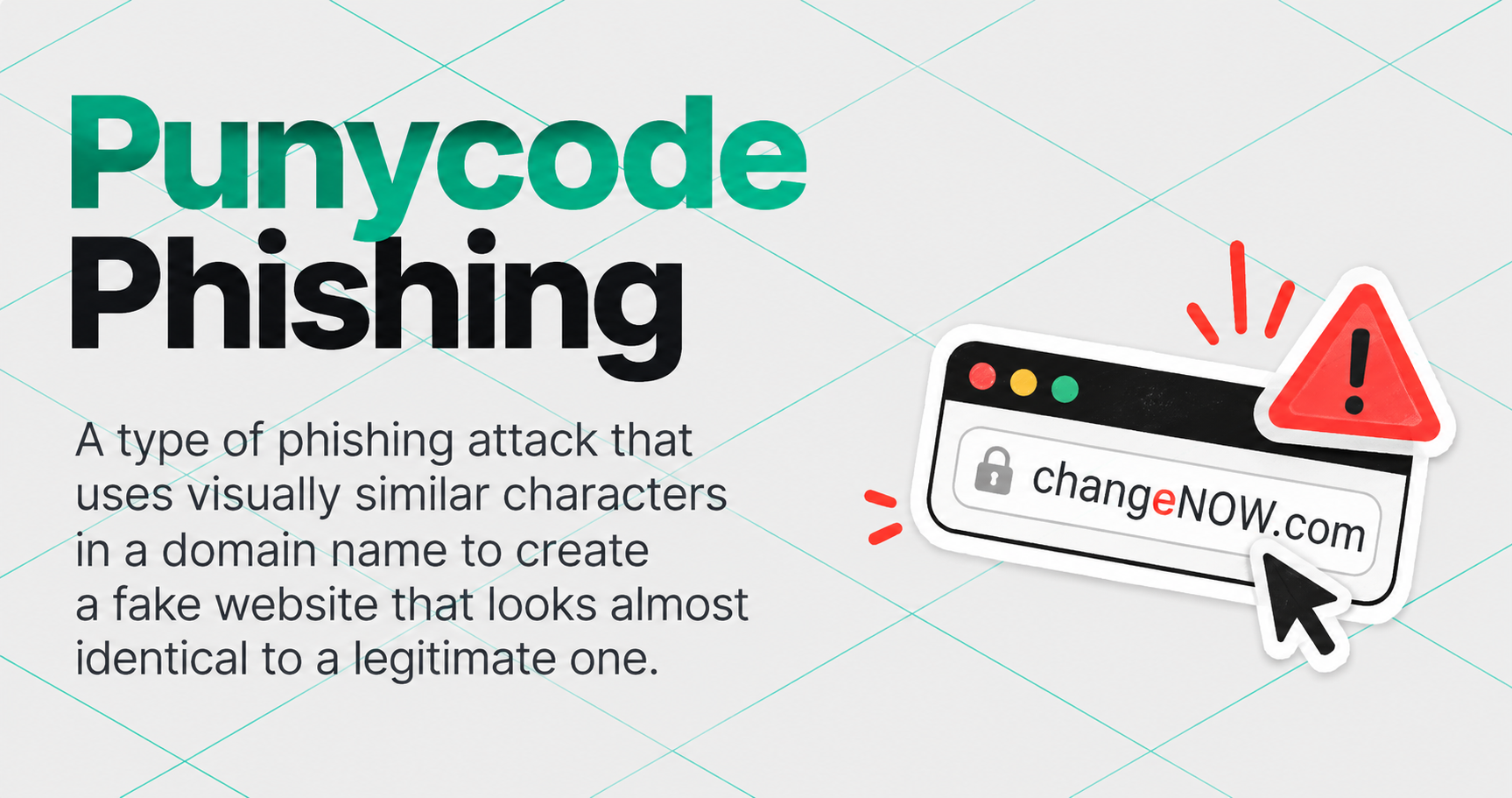
That small difference was enough.
The case is a useful reminder that checking a crypto website is not just about recognizing its logo, interface, or even its URL at a glance. Here's how lookalike domains work, why they can be difficult to spot, and what to check before sending crypto.
What Is Punycode Phishing and a Homograph Attack?
The internet supports domain names containing characters beyond the basic Latin alphabet. Punycode is a way of representing those Unicode characters using the limited set of ASCII characters supported by the Domain Name System.
There is nothing malicious about Punycode itself. It exists so internationalized domain names can work across internet infrastructure.
The problem is that characters from different alphabets can sometimes look remarkably similar.
A Latin letter can, for example, be replaced with a visually similar character from another alphabet.
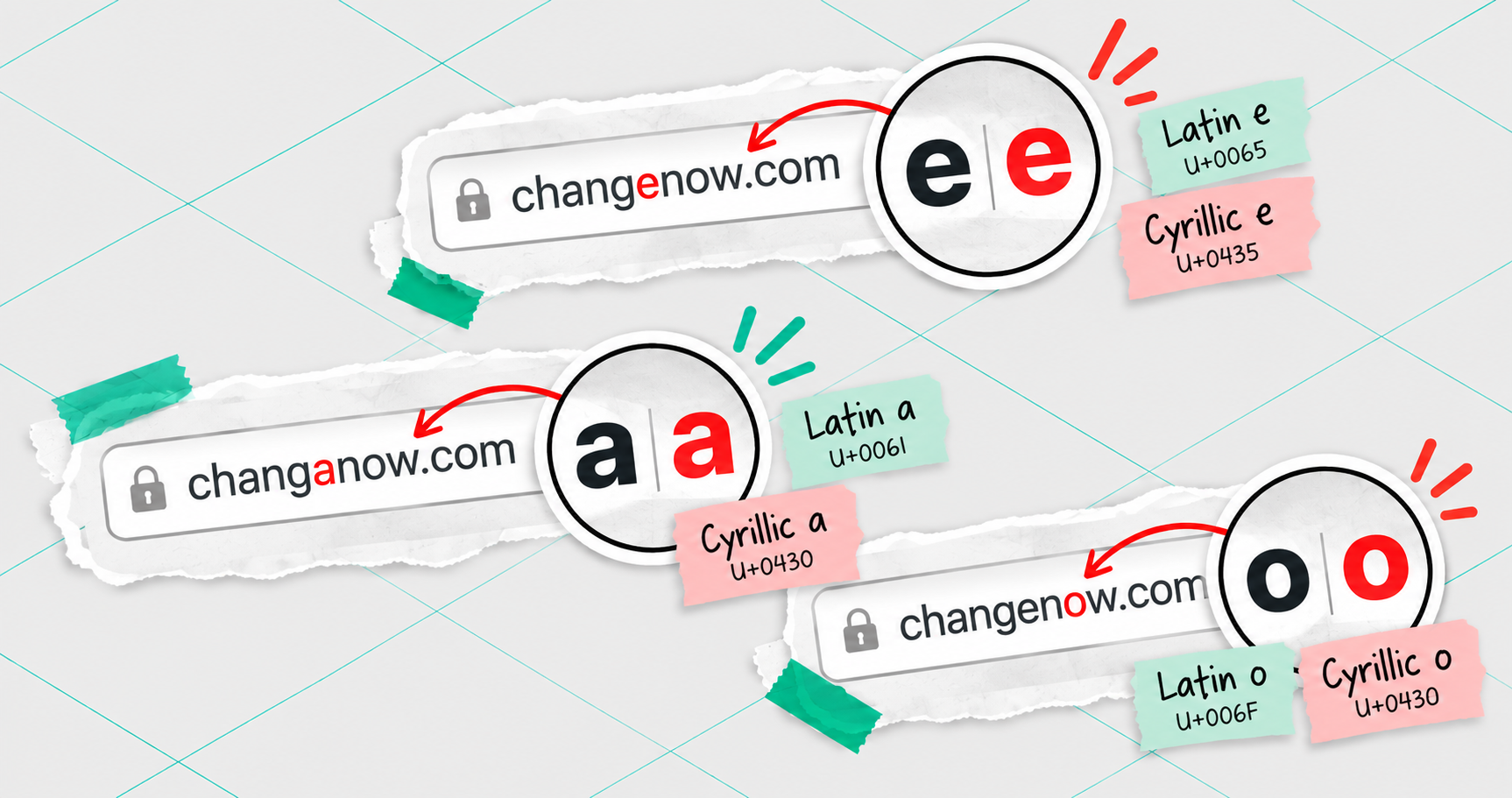
The resulting domain is technically different, but the difference may be almost invisible when displayed normally.
Attackers can exploit this in what is known as a homograph attack, or more specifically an IDN homograph attack when internationalized domain names are involved.
“Even experienced crypto users can miss the difference. We tend to recognise familiar names rather than inspect every character, especially on a phone or under time pressure. So-called Punycode attacks exploit similar-looking characters, such as a Latin ‘a’ and a Cyrillic ‘а’, to create a separate domain that visually resembles the original. Technically, these are IDN homograph attacks. Punycode is the legitimate encoding mechanism behind internationalised domain names, not malicious code.” – says Albert Quehenberger, CEO of AQ Forensics and ChangeNOW Ambassador.
Instead of creating an obviously suspicious address such as:
- changenow-secure-example-com
an attacker can register something that appears much closer to the real brand name.
In the ChangeNOW phishing case reported by SlowMist, the security company specifically pointed to an abnormal letter “e” in the fake domain. Secondary reporting identified it as a Cyrillic lookalike.
How Lookalike Domain Phishing Targets Crypto Users
A convincing crypto phishing site needs more than a similar domain.
Once attackers register a lookalike domain, they can recreate the appearance of a legitimate crypto exchange, wallet, or service: its logo, colors, navigation, exchange interface, asset selectors, and other familiar elements.
Generative AI has made this process even easier. Attackers no longer need strong web development skills to build a convincing imitation from scratch. AI-powered website builders and coding assistants can reproduce layouts and generate functional web pages in minutes, further lowering the barrier to creating phishing sites.
As Albert Quehenberger puts it:
“Generative AI reduces the time and technical expertise required. Attackers can use it to help write code, replicate websites and produce convincing text in multiple languages. In our work, we also encounter fraudulent websites featuring images that show signs of AI generation. Combined with convincing text, these can create a professional appearance. Correct grammar and high-quality images are therefore not reliable evidence that a provider is legitimate.”
The result can look completely ordinary.
That is particularly dangerous in crypto because the final step often involves sending funds or connecting a wallet. A user who believes they are interacting with a legitimate service may follow payment instructions provided by the fake website and send assets to an address controlled by the attacker.
The May 2025 case also illustrates another problem: the path to a phishing website does not necessarily look suspicious either.
According to SlowMist, the victim reached the fake ChangeNOW site after clicking a Chrome recommendation. The security firm subsequently warned users not to rely blindly on browser recommendations.
In other words, phishing does not always arrive as a badly written message asking you to click an obviously strange link. A malicious site can appear during otherwise normal browsing.
Phishing can take many other forms, from fake websites to malicious messages and social engineering. For a broader overview, see our guide on how to avoid phishing scams.
Why Lookalike Domains and Punycode Attacks Are Hard to Spot
Most people do not inspect a URL character by character every time they open a familiar website.
We recognize patterns.
If the beginning and end of a brand name look right, the interface is familiar, and the page behaves roughly as expected, there may be little reason to stop and examine one slightly unusual letter.
Punycode and homograph attacks exploit exactly that behavior.
There are several reasons a fake site can initially appear trustworthy:
-
The domain looks almost identical. A substituted Unicode character may be difficult or even impossible to distinguish at a glance.
-
The interface can be copied. Logos, layouts, text, and other public website elements can be reproduced by attackers.
-
The route to the site may feel normal. Search results, browser suggestions, ads, social media posts, or messages can all become routes to phishing pages.
-
HTTPS is not proof of identity. The padlock indicates that the connection to that particular website is encrypted. It does not prove that the website belongs to the company you intended to visit.
“Logos, layouts and text can all be copied. A professional appearance, working menus and displayed exchange rates do not prove that a website belongs to the genuine provider. HTTPS encrypts the connection to the domain you are visiting. It does not establish that the operator is trustworthy. Search results and advertisements are not guarantees of authenticity either.” — Albert Quehenberger adds.
A website can have a secure connection and still be the wrong website.
How to Spot a Fake Crypto Website or Phishing Domain
You do not need to manually decode every Punycode domain you encounter to identify a suspicious or fake crypto website. A few checks can help you spot a phishing domain before you connect a wallet or send funds.
“First, check the web address, not just the name or logo on the page. Second, verify the recipient and payment details, including the full wallet address, cryptocurrency, network and amount. Third, ask yourself why you are sending the money in the first place. Never let anyone pressure you into paying. If someone insists you must act immediately, stop and check before sending anything.” – Albert Quehenberger advises.
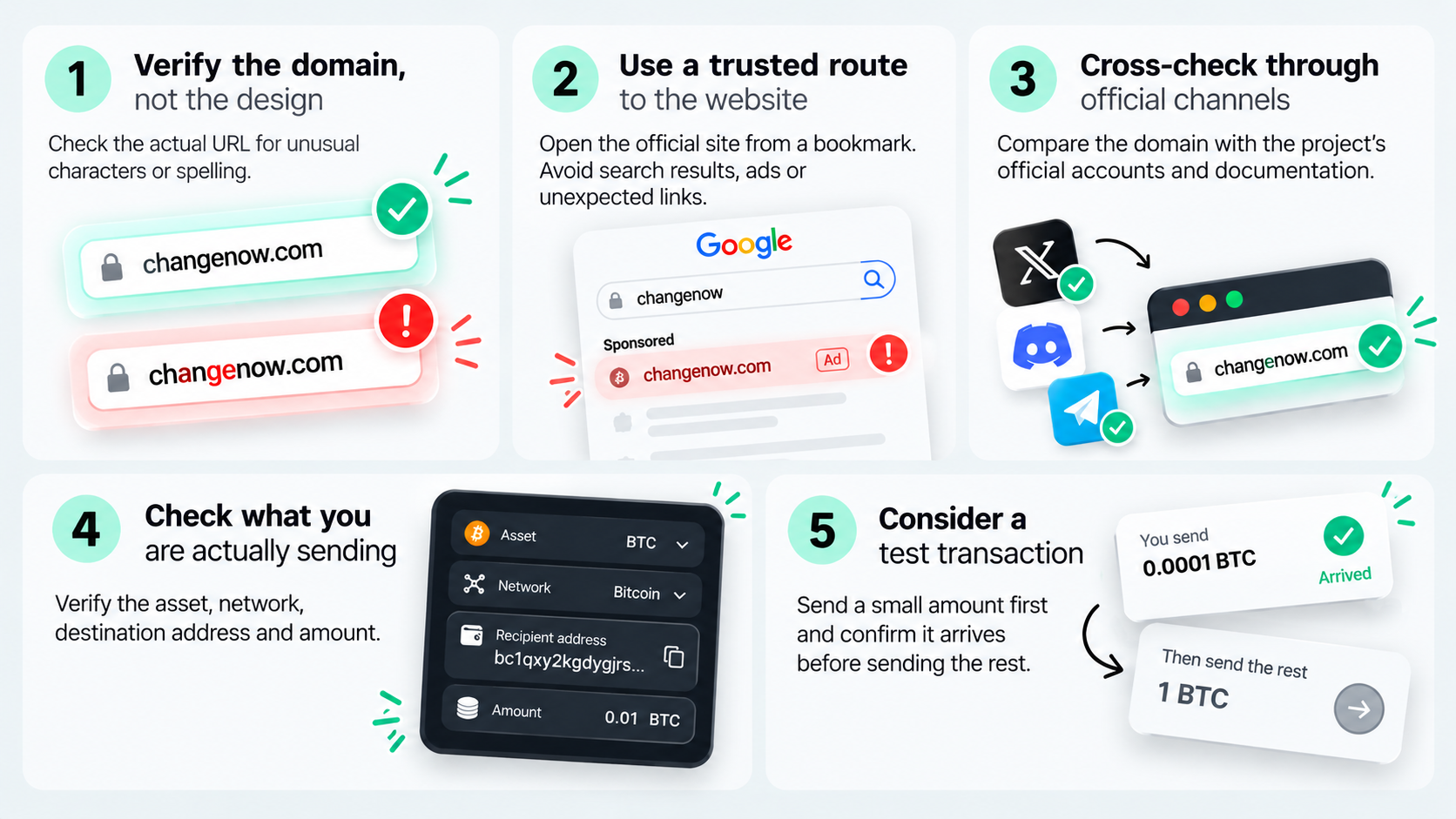
1. Verify the domain, not the design
A familiar interface proves very little. A fake crypto site or lookalike domain can copy the branding of a legitimate service almost perfectly. Before entering sensitive information, connecting a wallet, or sending crypto, check the actual domain.
Pay particular attention to unexpected characters, unusual spelling, extra words, or anything that looks slightly different from the address you normally use.
2. Use a trusted route to the website
For services you use regularly, save the verified official website as a bookmark.
Avoid treating browser recommendations, search results, advertisements, or links sent through social media as confirmation that a website is legitimate. SlowMist specifically highlighted browser recommendations as a risk following the ChangeNOW impersonation case.
If you receive a link unexpectedly, verify the company's official domain independently before using it.
3. Cross-check through official channels
If something looks unusual, stop before interacting with the website.
Check the domain against the company's verified social accounts, documentation, or other official channels. For crypto projects and services, established third-party directories can provide an additional point of comparison, but they should not replace verification through the project's own official resources.
4. Check what you are actually sending
Website verification is only one part of the process.
Before confirming a crypto transaction, check:
the asset → the network → the destination address → the amount
Do not rely solely on the information displayed elsewhere on the page.
Crypto transactions are generally irreversible. Once funds have been confirmed on-chain and transferred to an address controlled by a scammer, recovery can be extremely difficult.
5. Consider a test transaction
For a large transfer to an unfamiliar address, sending a small amount first can provide another layer of protection.
Confirm that the test transaction reaches the intended destination before sending the remaining funds.
It adds an extra step. Losing a few seconds is generally preferable to discovering that one strange-looking letter just received your entire transaction.
What to Do If You Opened a Phishing Site
What you should do next depends on how far the interaction went.
If you only opened the website, close it. Do not download anything, enter credentials or recovery phrases, connect your wallet, or approve requests from the page.
If you connected a wallet or signed something, review what permissions or token approvals you granted. Revoke suspicious approvals where appropriate. If you believe sensitive wallet credentials such as a seed phrase or private key may have been exposed, treat that wallet as compromised and move remaining assets to a newly secured wallet as soon as it is safe to do so.
If you already sent crypto, collect as much information as possible immediately. Keep the phishing URL, transaction hash, receiving address, screenshots, timestamps, and any communication connected with the incident.
“When contacting ChangeNOW Support, provide as much information as possible: your exchange ID, transaction hash, wallet address, cryptocurrency and amount, date and approximate time, the phishing or lookalike website URL, screenshots, and any other relevant evidence.” — ChangeNOW Support Manager shares.
Contact the relevant platforms and their official support channels as quickly as possible. Depending on the circumstances, you may also need to report the incident to law enforcement.
“If funds have already been sent through a fake website impersonating ChangeNOW, Support can pass the case to our Compliance team for further review. They can investigate the transaction, blacklist scam-related wallet addresses to prevent future use, and cooperate with law enforcement if the victim reports the case to the police. However, we cannot reverse a completed blockchain transaction or guarantee that stolen funds can be recovered.” — ChangeNOW Support Manager adds.
Do not delete evidence simply because the transaction has already happened. Blockchain transactions leave a trail, and transaction details can become important during an investigation.
In some cases, that trail can help investigators identify and intercept stolen funds.
If It Looks Like ChangeNOW, Make Sure It Is ChangeNOW
Scammers can copy branding. They can recreate interfaces. They can register domains designed to look almost identical to legitimate ones.
What they cannot do is turn that imitation into the official ChangeNOW service.
Before making an exchange, make sure you are using the official ChangeNOW website and verify the transaction details before sending your funds.
Be equally careful with messages claiming to come from ChangeNOW. Never share your private keys or seed phrase, and use only official ChangeNOW channels when contacting the team.
“Clients should contact ChangeNOW only through official support channels, including [email protected]. They should never move a conversation to Telegram DMs, even if the profile looks like a ChangeNOW employee or uses the same name and photo. If someone asks them to continue in private messages, they should treat it as a scam.” — ChangeNOW Support Manager says.
How to recognize crypto phishing emails
If you encounter a suspicious website impersonating ChangeNOW, or believe you may have interacted with one, stop before sending any additional funds and contact ChangeNOW Support through an official channel. Provide any relevant URLs, transaction hashes, addresses, screenshots, and other details you have. The team will review the information and do its best to assist as quickly as possible.
Verify the Destination, Not Just the Design
The most dangerous phishing sites do not necessarily look suspicious. They look familiar, and that’s exactly why lookalike-domain attacks work.
Before sending crypto, take a few seconds to check where you are and where your funds are going.


