• Main
  • Blog
  • Industry
  • How to Swap Any Crypto in Your Trust Wallet [Complete Guide 2025]

How to Swap Any Crypto in Your Trust Wallet [Complete Guide 2025]

This guide walks you through swapping tokens, adding networks, fixing common issues, and using ChangeNOW for smooth cross-chain swaps, so you can manage your crypto right inside Trust Wallet.

How to swap crypto in Trust Wallet

Overview

Swapping tokens used to involve multiple exchanges, identity checks, and reliance on third parties. Today, Trust Wallet simplifies this with its in-wallet swap feature, allowing you to quickly trade tokens securely while keeping control of your assets. With support for over 160 blockchains and integration with services like ChangeNOW for cross-chain swaps, Trust Wallet is a trusted tool for millions of active users.

This guide will show you how to swap tokens, add networks, troubleshoot issues, and use ChangeNOW for seamless cross-chain swaps, helping you manage your crypto directly within Trust Wallet.

Key Takeaways

  • Trust Wallet is a secure, self-custody wallet that supports 160+ blockchains, making it easy to store, send, and swap cryptocurrencies.
  • Swapping tokens inside Trust Wallet is fast and convenient, with same-chain swaps offering low fees and cross-chain swaps (e.g., using ChangeNOW) for more flexibility.
  • To prepare for swaps, add the necessary tokens and networks, ensure you have enough gas, and keep the app updated.
  • ChangeNOW enables seamless cross-chain swaps, bypassing Trust Wallet limits and offering access to more tokens.
  • Common issues like "swap failed" or "token not appearing" can be fixed by checking gas, network compatibility, or using ChangeNOW for unsupported tokens.

What Trust Wallet Is

Trust Wallet is a decentralized, self-custody wallet that supports **over 100 different blockchains **and thousands of cryptocurrencies. With its easy-to-use interface and robust security features, Trust Wallet allows users to store, send, receive, and exchange cryptocurrencies directly from their mobile devices. The wallet supports both ERC-20 tokens (Ethereum-based) and native tokens from various blockchains like BNB Chain, Solana, and others, making it a versatile tool for crypto users.

Why Swap Tokens Inside the Wallet?

Swapping tokens inside Trust Wallet has a variety of benefits:

  • Convenience: Swap your assets directly without needing to leave the app.
  • Security: Trust Wallet never stores your private keys. Your assets remain in your control.
  • Speed: The in-wallet swaps offer a seamless and fast way to exchange tokens without going through centralized exchanges.

Preparing Trust Wallet for Swaps

Before performing any swaps, it’s important to make sure that your Trust Wallet is fully prepared. Follow these steps to ensure everything is set up correctly.

Key Preparations

Task Description
Adding Tokens Add the tokens you want to swap if they are not in your wallet yet.
Adding Networks Ensure that the networks (e.g., BNB Chain, Polygon, Arbitrum) are available in your wallet.
Updating the App Make sure that your Trust Wallet app is up to date to access the latest features.
Having Enough Network Gas Ensure you have enough native tokens (e.g., ETH for Ethereum) to cover gas fees.
Understanding Chain Compatibility Make sure the tokens you want to swap are on compatible chains (e.g., ERC-20 tokens can be swapped within Ethereum).

How to Swap Tokens in Trust Wallet

Now that your Trust Wallet is properly set up, let’s go through the process of swapping tokens.

A same-chain swap is when you exchange one token for another within the same blockchain. For example, swapping BNB for BUSD on the BNB Chain.

Steps to Swap Tokens on the Same Chain:

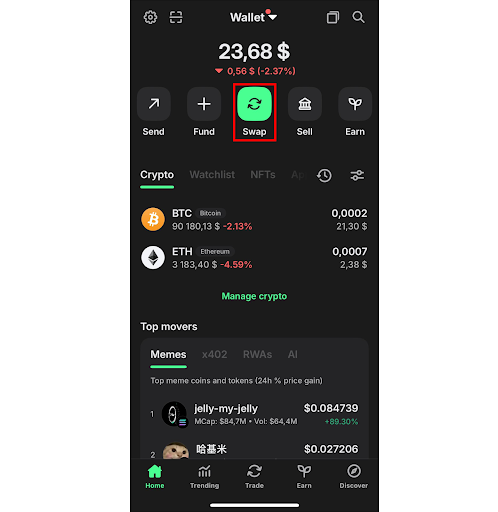
  1. Open Trust Wallet and go to the "Swap" section (usually found on the main screen). This screenshot shows how to find Swap section in Trust Wallet

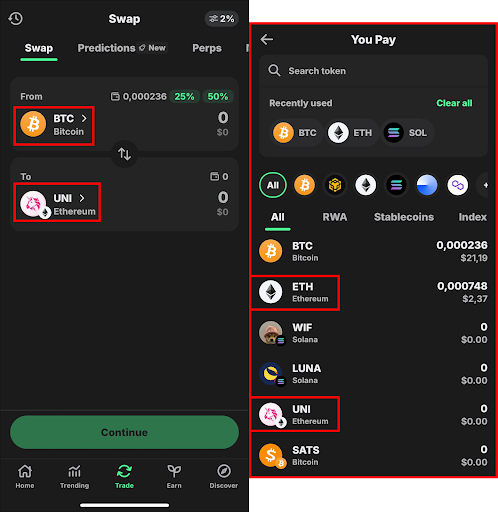
  2. Select the token you want to swap from (e.g., ETH) and the token you want to swap to (e.g., UNI). This screenshot shows how to find needed tokens for swap in Trust Wallet

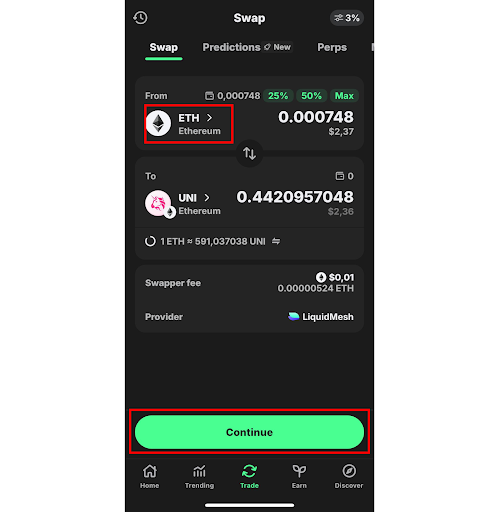
  3. Enter the amount you wish to swap and check the estimated amount of the token you’ll receive. If everything looks good, click "Continue" to proceed with the transaction. This screenshot shows the details of transaction in Trust Wallet

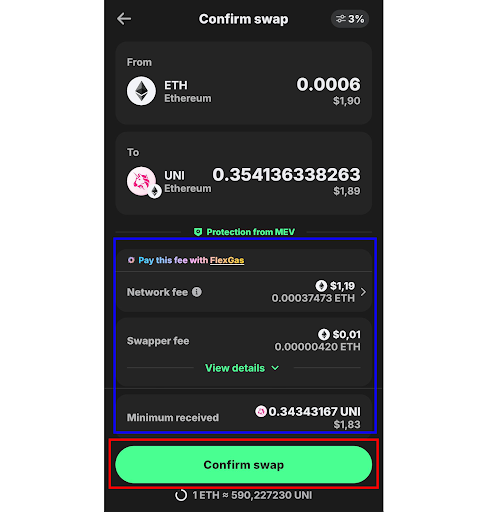
  4. Review the details:

    • From: The token you're swapping (e.g., ETH).
    • To: The token you'll receive (e.g., UNI).
    • Network fee: The fee for the network transaction.
    • Swapper fee: The fee for the swap.
    • Minimum received: The minimum amount of tokens you’ll receive after the fees.

If all looks correct, click "Confirm Swap" to finalize the transaction. This screenshot shows the transaction details and the following step

This type of swap is fast and incurs minimal fees since both tokens are on the same blockchain, and there is no need to bridge assets across different networks.

Cross-Chain Swap Explained

A cross-chain swap involves exchanging tokens across different blockchains. For instance, swapping ETH (Ethereum) for BNB (BNB Chain).

Cross-chain swaps are more complex than same-chain swaps, as they require additional mechanisms to bridge tokens across networks. This is where ChangeNOW comes in — a service that seamlessly enables cross-chain swaps within Trust Wallet.

Why Some Tokens Cannot Be Swapped Directly Inside Trust Wallet

Not all tokens can be swapped directly within Trust Wallet. Some tokens are not supported by the integrated decentralized exchanges (DEXs) or might not be available on the same network. In such cases, users can resort to services like ChangeNOW to swap unsupported tokens.

How to Connect and Use Trust Wallet with ChangeNOW

ChangeNOW allows Trust Wallet users to swap tokens across different blockchains without needing to leave the wallet app. Here’s how to do it:

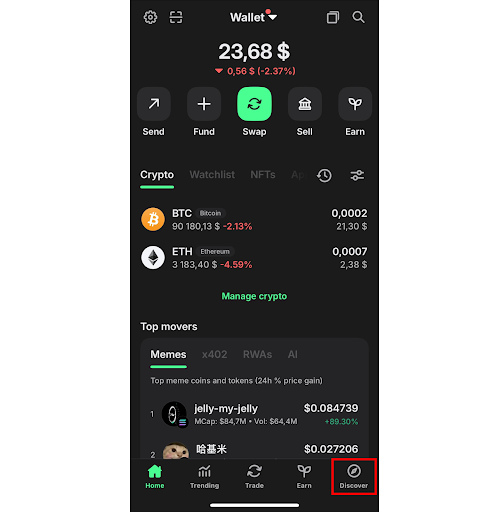
  1. Open Trust Wallet and navigate to the "Discover" section. This screenshot shows how to find Discover section in Trust Wallet

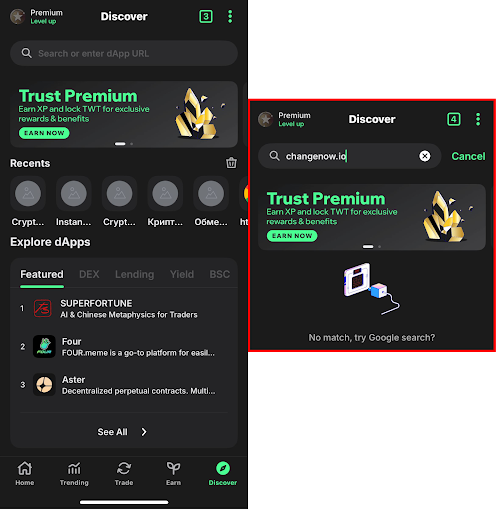
  2. In the DApps browser, search for ChangeNOW. This screenshot shows how to find ChangeNOW in the Trust Wallet's Discover section

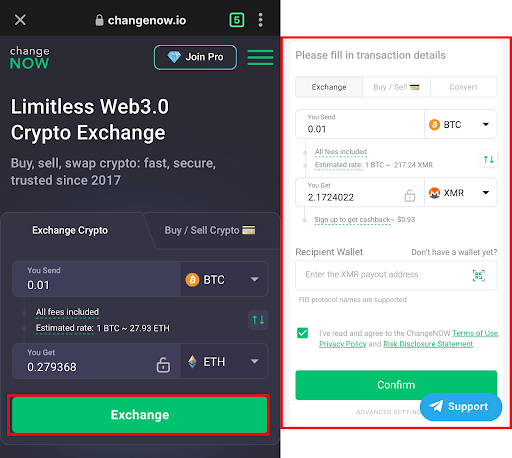
  3. Select the amount and tokens you want to swap, for example, BTC to XMR. This screenshot shows how to use ChangeNOW in the Trust Wallet

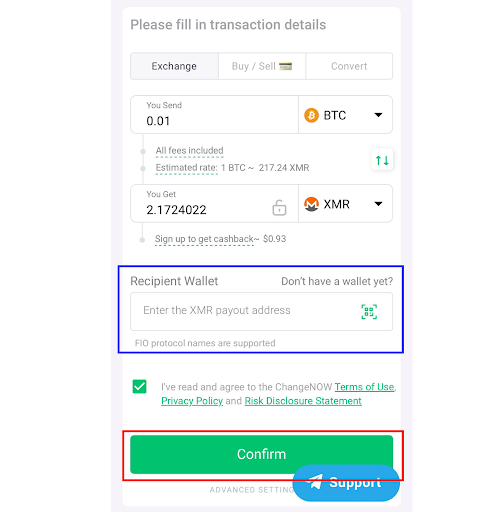
  4. Enter your receiving address and confirm the swap. This screenshot shows how to swap crypto on ChangeNOW

  5. ChangeNOW will handle the entire process, ensuring a seamless swap between different chains (e.g., swap BTC to Base ETH on Trust Wallet).

This integration with ChangeNOW provides users with an additional layer of convenience and flexibility, enabling you to swap virtually any crypto asset within Trust Wallet.

Troubleshooting & Common Issues

As with any cryptocurrency platform, you may run into some issues while swapping in Trust Wallet. Here are the most common problems and their solutions.

Common "Swap Failed" Reasons

  • Network Congestion: Sometimes, the network you're swapping on might be congested, leading to transaction delays. Try waiting and retrying later.

  • Token Compatibility: Not all tokens are compatible with the DEXs within Trust Wallet. If a token isn’t showing up or isn’t available for swap, use ChangeNOW to bypass this limitation.

Not Enough Gas

To swap tokens on certain networks (e.g., Ethereum, BNB Chain), you need to have enough native tokens (ETH for Ethereum, BNB for BNB Chain) to pay for gas fees. Make sure your wallet is topped up with enough gas tokens.

Token Not Appearing

If your token isn’t showing up in your wallet after a swap, make sure that the token is added to your wallet. You can manually add tokens by entering their contract address.

Why Price Impact Is High

Price impact occurs when there is insufficient liquidity in the market for a particular token pair. If you're experiencing high slippage, try swapping at a different time or using ChangeNOW to find better liquidity.

Why Some Tokens Are Not Available for Swap

Certain tokens may not be available due to regulatory restrictions, low liquidity, or the lack of support by integrated DEXs. In such cases, you can use ChangeNOW to swap unsupported tokens.

How to Bypass Trust Wallet Limits and Swap Any Crypto

If Trust Wallet imposes limits on certain swaps or tokens, you can use ChangeNOW to swap any cryptocurrency regardless of the limitations. This allows you to access a wider range of tokens and pairs across multiple blockchains.

FAQ

1. How Long Does a Swap Take in Trust Wallet?

The duration of a swap depends on the network and the tokens being swapped. On average, same-chain swaps take a few minutes, while cross-chain swaps may take longer due to bridging processes.

2. Can I Swap Tokens Directly from Trust Wallet to an Exchange?

Yes, you can use ChangeNOW to swap tokens directly to an exchange without the need for an intermediary.

3. Is ChangeNOW the Best Option for Cross-Chain Swaps?

Yes, ChangeNOW offers seamless cross-chain swaps, making it one of the best options for swapping between different blockchains without leaving your wallet.

4. How to Add Pulse Chain to Trust Wallet?

To add Pulse Chain to Trust Wallet, go to Settings > Networks, then manually enter the network details (RPC URL, Chain ID, etc.).

5. How to Convert WETH to ETH in Trust Wallet?

To convert WETH to ETH in Trust Wallet, go to the Swap section, select WETH as the token you want to swap and ETH as the token you want to receive.

IndustryChangeNOW
Exchange Crypto
icon-btc
BTC
icon-eth
ETH

Unlock the power of exchange with Pro features

  • Staking
  • Cashback
  • VIP plan for free
  • More benefits